ChatGPT vs Claude vs Gemini: How Their Chat Sharing Works
Compare how ChatGPT, Claude, and Gemini share AI conversations, including what each link includes, who can view it, and what to redact before sending.
April 27, 2026
ChatGPT, Claude, and Gemini all let you share AI conversations, but their links do not behave exactly the same way. ChatGPT shared links are conversation snapshots. Claude shared chats are snapshots too, with plan-specific sharing limits. Gemini creates public links that can be read, reshared, and often continued by someone else.
Highlight Reel
Share the useful AI turns, not the whole thread
Turn long ChatGPT, Claude, or Gemini conversations into clean, readable links with the private parts removed.
The practical rule is simple: use the native share link when the original AI chat is the thing you need to show. Use a clean transcript link when the reader needs the useful parts without the whole thread, private context, or platform-specific behavior.
Quick Answer
If you only need the shortest comparison, use this:
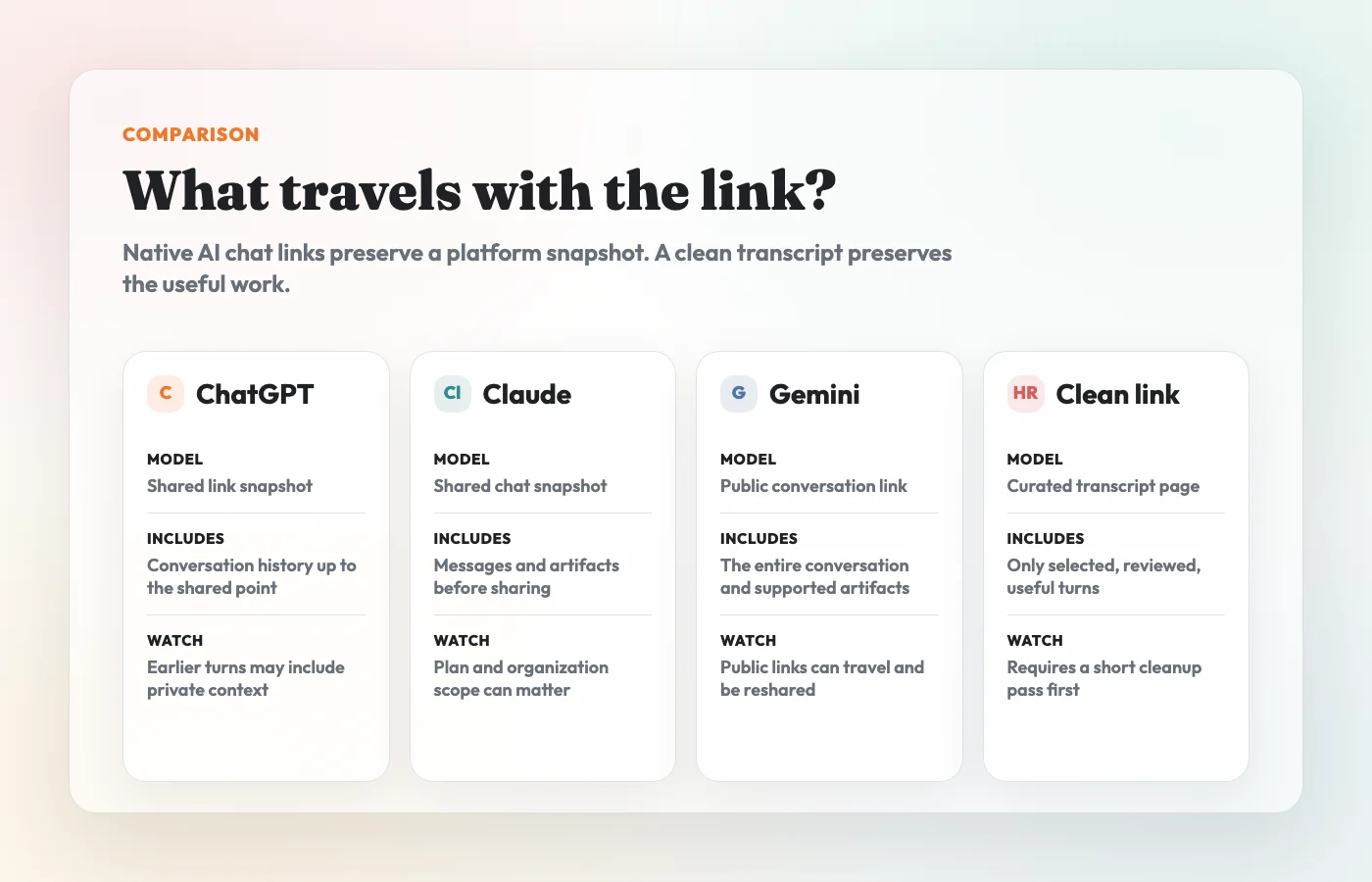
| Platform | Native sharing model | What the link includes | Who can view it | Best for | Main risk |
|---|---|---|---|---|---|
| ChatGPT | Shared link | A snapshot of the entire conversation up to the point it was shared | Anyone with the link, according to OpenAI's general shared links FAQ | Sharing a ChatGPT conversation as a reference | The link may include more history than the reader needs, and OpenAI does not currently offer granular link permissions or expiration |
| Claude | Shared chat | A snapshot of messages sent before sharing, including artifacts; later messages stay private unless reshared | Anyone with the link on free, Pro, and Max; Team and Enterprise sharing is limited to the organization | Showing the exact Claude chat or artifact state | The scope depends on plan, and the snapshot can still contain sensitive prompts or outputs |
| Gemini | Public link | The entire conversation, with supported generated artifacts; uploaded images may be available from the shared chat | Anyone with the public link can read and reshare it, with continuation behavior documented by Google | Sharing a Gemini response or conversation publicly | Public links can travel, be reshared, and may be continued by viewers in their own Gemini Apps activity |
| Clean transcript link | Curated page you create from selected turns | Only the parts you keep, format, and redact | Depends on the sharing tool you use | Work handoffs, docs, tickets, and reusable decisions | Requires a short cleanup step before sharing |
For work conversations, the safer default is usually not "which AI platform has the best share button?" It is "what does this reader actually need, and what should not travel with the link?"
Why Native AI Chat Sharing Feels Similar But Works Differently
Native AI chat links all solve the same problem: they are faster than screenshots. Instead of stitching images together, you can create a link to a conversation and send it to someone else.
But the details matter:
- some links expose the entire conversation, not just the last answer
- some links are public to anyone who has the URL
- some links can be reshared or continued
- some links include artifacts, images, or other generated outputs
- some sharing rules change for business, team, enterprise, workspace, or organization accounts
- deleting a link may not remove copies or activity created by someone else
That is why a native share link should be treated like a document, not like a casual screenshot. Before you share it, assume it can travel farther than the original message thread.
ChatGPT Shared Links
ChatGPT shared links are useful when you want to share a ChatGPT conversation as it existed at a point in time.
OpenAI's shared links FAQ describes the feature as a way to create a unique URL for a ChatGPT conversation. The important detail is scope: a ChatGPT shared link is a snapshot of the entire conversation up to the point the link was created. If the conversation has ten prompt-and-response turns, the shared link is not just the last answer. It includes the history up to that point.
OpenAI also says anyone with access to a shared link can view the linked conversation. The FAQ notes that shared links do not currently have granular permissions or expiration dates. You can delete or invalidate shared links, but if someone imported the conversation into their own chat history, deleting your link does not remove that imported copy.
Use a ChatGPT shared link when:
- the whole ChatGPT thread is already clean enough to share
- the recipient needs to see the original conversation sequence
- you want a lightweight reference point for a discussion
- you are comfortable with the entire included history
Do not use it as a shortcut around redaction. If the thread includes internal URLs, customer context, private prompts, copied source material, or secrets, clean it first.
Claude Shared Chats
Claude shared chats are also snapshots, but Anthropic documents a few details that make them distinct.
Anthropic's sharing guide says Claude chats are private by default, and sharing creates a snapshot that can be viewed through a direct link. The snapshot includes messages sent before sharing, including artifacts. Messages sent after sharing remain private by default. If you unshare and share again, the snapshot can be updated to include newer messages.
Claude's sharing behavior also depends on plan context. Anthropic's help doc says users on Team and Enterprise plans can only share chats with other members of the same organization, not publicly. For free, Pro, and Max users, the same doc describes a shared chat management area under privacy settings where users can review and unshare shared chats.
Anthropic also notes that attached files themselves are not included in the shared snapshot, and raw data from MCP tool calls remains hidden. That is useful, but it does not mean the visible conversation is safe by default. The prompt and model output can still reveal private facts.
Use a Claude shared chat when:
- the recipient needs the original Claude conversation
- the thread is short and already safe to share
- an artifact is part of the thing being reviewed
- your plan and organization rules match the intended audience
Use a cleaned transcript when the reader only needs the decision, answer, code, or reasoning trail.
Gemini Public Links
Gemini's share feature is framed around public links.
Google's Gemini Apps help says sharing a Gemini conversation creates a public link. Anyone with the link can read the chat, even if you did not share it with them directly. Google also documents that public links can be reshared. In many cases, viewers can continue the shared chat in Gemini Apps on their own, with exceptions such as chats created with Gems and users under 18.
Gemini's help page also says that creating a public link shares the entire conversation. If you upload an image to a chat and then share the chat, the image is available and downloadable from the shared chat. Google says the shared page shows the chat as it appeared when the public link was created, so later edits or continuation do not change the shared page.
Use a Gemini public link when:
- you intentionally want a public-link style artifact
- the entire conversation is safe to show
- the generated output or artifact should be easy to reshare
- you have checked whether your organization allows conversation sharing
Be especially careful with Gemini links when the chat includes images, private context, or anything copied from a confidential source.
Native Share Links vs Clean Transcript Links
Native share links are best when fidelity matters. Clean transcript links are best when handoff quality matters.
| Sharing option | Use it when | Avoid it when |
|---|---|---|
| ChatGPT shared link | You want to show the original ChatGPT conversation snapshot | The earlier turns contain sensitive or irrelevant context |
| Claude shared chat | You want to share the original Claude snapshot, especially if artifacts matter | The recipient does not need the whole conversation or your plan rules are unclear |
| Gemini public link | You want a public-link style Gemini conversation that can be read and reshared | The chat includes confidential information, uploaded images, or context that should not travel |
| Screenshot | You need one short visual moment | The value is in text, code, tables, links, or context |
| Clean transcript link | You need a readable, trimmed, redacted handoff | You need to preserve the exact native platform state for audit or reproduction |
The format should follow the reader's job. If they need to verify exactly what happened in the AI product, send the native link. If they need to understand and reuse the useful parts, send a cleaned transcript.
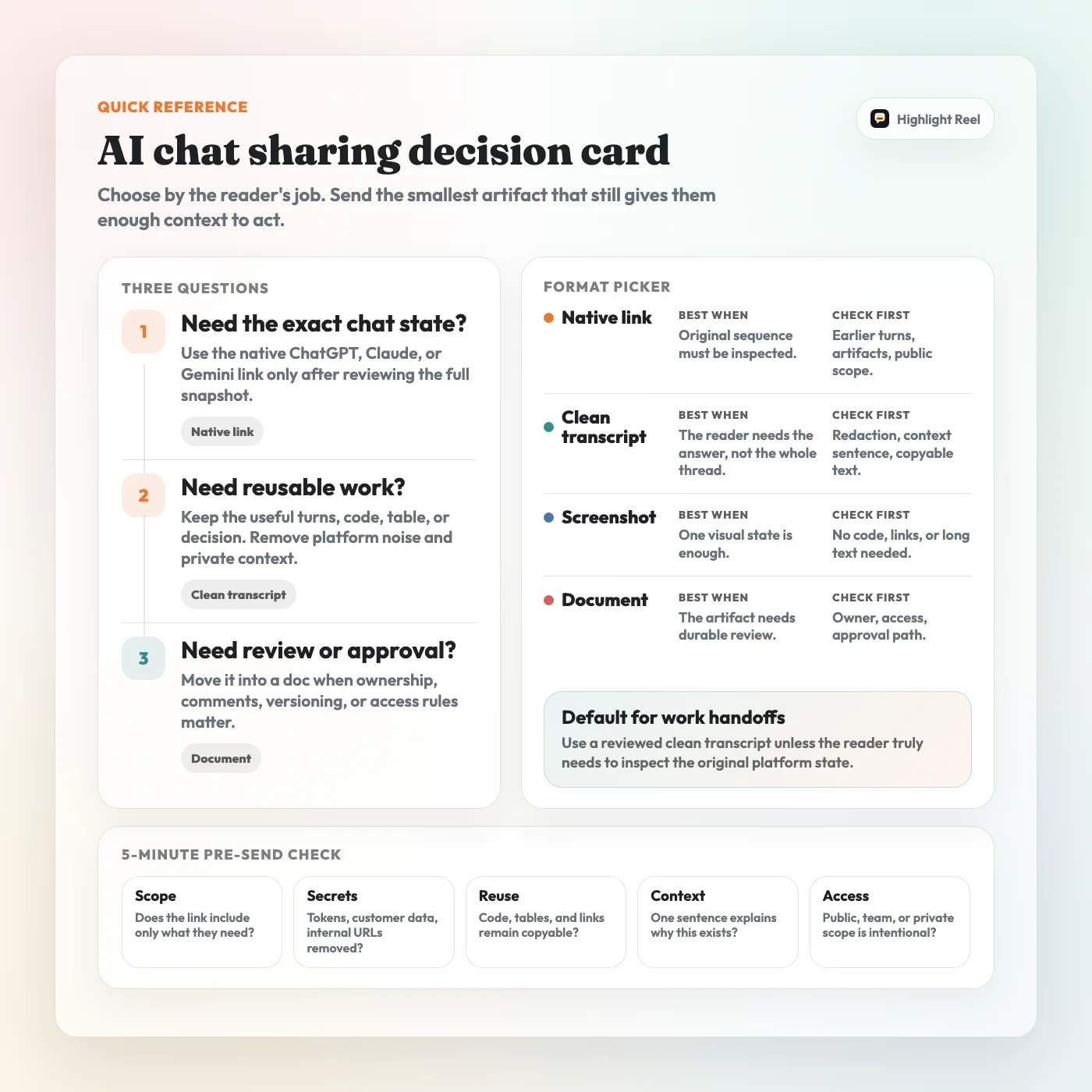
Download the AI chat sharing decision card
A Safer Sharing Workflow
Before sharing any ChatGPT, Claude, or Gemini conversation, run this workflow.
1. Decide What The Reader Needs
Start with the receiving person, not the platform.
Ask:
- Do they need the original AI chat?
- Do they need the final answer?
- Do they need the reasoning trail?
- Do they need to copy code, links, tables, or prompts?
- Do they need to approve a decision?
- Do they need every turn, or only the useful turns?
This decides whether a native share link is appropriate or whether a clean transcript is better.
2. Check What The Native Link Includes
Before copying the link, preview or review the content that will be shared.
Look for:
- earlier prompts that include private context
- customer, vendor, or employee names
- internal project names
- confidential strategy or pricing notes
- uploaded images or generated artifacts
- code, logs, stack traces, file paths, or URLs
- messages that make the thread noisy or misleading
The important question is not "can the platform share this?" It is "should this exact snapshot travel?"
3. Redact Before Sharing
Redaction is not a final polish step. It is part of sharing.
Remove or rewrite:
- API keys, tokens, secrets, and credentials
- personal data such as emails, phone numbers, addresses, or account IDs
- customer names and private customer context
- unreleased roadmap, pricing, hiring, legal, HR, or finance details
- internal links, private repository paths, and local file paths
- copied text from private docs, tickets, or conversations
- irrelevant turns that distract from the useful answer
If the reader does not need a detail, do not make them responsible for ignoring it.
4. Preserve Useful Structure As Text
Screenshots are fast, but they flatten useful information into pixels.
For anything work-related, preserve:
- code blocks
- prompts
- tables
- links
- checklists
- numbered steps
- decisions and assumptions
That is where a clean transcript link is useful. It keeps the useful parts readable and reusable without forcing the recipient through the whole platform thread.
5. Add A Handoff Note
Do not send the link without context.
A good handoff note can be one sentence:
I cleaned up the useful AI conversation behind this decision. The key parts are the original constraint, the comparison table, and the final checklist.That small framing tells the recipient how to read the link.
Where Highlight Reel Fits
Highlight Reel is for the middle ground between a raw native AI share link and a heavy document.
Use Highlight Reel when you want to:
- select only the useful ChatGPT, Claude, or Gemini turns
- keep the original task and enough context
- remove private or distracting details
- preserve code, tables, links, and steps as real text
- share a clean page in Slack, Notion, email, docs, or a ticket
It does not replace your company's security policy, access controls, or review process. It gives you a lighter way to turn a useful AI conversation into something another person can actually read.
FAQ
Are ChatGPT shared links public?
OpenAI's general shared links FAQ says anyone with access to a shared link can view the linked conversation. Treat the link as shareable, and do not include sensitive content unless you have already removed it.
Does a ChatGPT shared link include the whole conversation?
It includes the conversation up to the point the link was created. That can mean more history than the final answer, so review the full snapshot before sending it.
Are Claude shared chats public?
It depends on the plan context. Anthropic's sharing guide says shared chat links can be viewed by anyone with the link for free, Pro, and Max users, while Team and Enterprise users can only share chats with other members of the same organization.
Does Claude share messages added after the link was created?
Not by default. Anthropic's guide says the shared snapshot includes messages sent before sharing, while later messages remain private unless you unshare and share again.
Does Gemini share the whole conversation?
Yes. Google's Gemini Apps help says creating a public link shares the entire conversation. It also says anyone with the link can read and reshare the chat.
Is a clean transcript link safer than a native AI share link?
It can be safer only if you actually clean it. The safety comes from selecting the useful turns, removing sensitive details, and preserving the right context before sharing.
Should I use screenshots instead?
Use screenshots for one short visual moment. Use text-based links when the value is in copyable text, code, tables, links, or a reasoning trail.
The Bottom Line
ChatGPT, Claude, and Gemini all make it easy to send an AI conversation link. That does not make every link a good handoff.
Native share links preserve the platform snapshot. Clean transcript links preserve the useful work.
For private, client-facing, or team-facing conversations, share the smallest useful artifact: enough context to understand the answer, enough structure to reuse it, and no private details that do not need to travel.