Long Claude Chat to Reusable Project Context: A Realistic Example
A realistic fictional example of turning a long Claude chat into reusable project context for future chats, teammates, and coding-agent handoffs.
May 13, 2026

A long Claude chat can produce real project memory: decisions, terminology, rejected paths, source links, architecture notes, and instructions that future work should reuse.
Highlight Reel
Turn long Claude chats into reusable project context
Save the decisions, stable rules, and selected transcript from long AI work as a clean context packet.
But a long chat is not the same as reusable project context.
This article shows a realistic fictional example of turning a long Claude chat into reusable project context. It is not a case study, customer story, or claim about a real project.
Use it when you need to save Claude chat as project context, and the practical question is: "What should I preserve from this long AI session so the next teammate or agent can continue?"
Quick Answer
To turn a long Claude chat into reusable project context, extract:
- stable project rules
- current goal and scope
- decisions made
- rejected paths
- source links or evidence
- files, docs, or systems involved
- what should be pasted into future chats
- what should stay as a separate note
- next action and owner
Do not save the entire chat as permanent project instructions. Use the long chat as evidence, then create a smaller context packet.
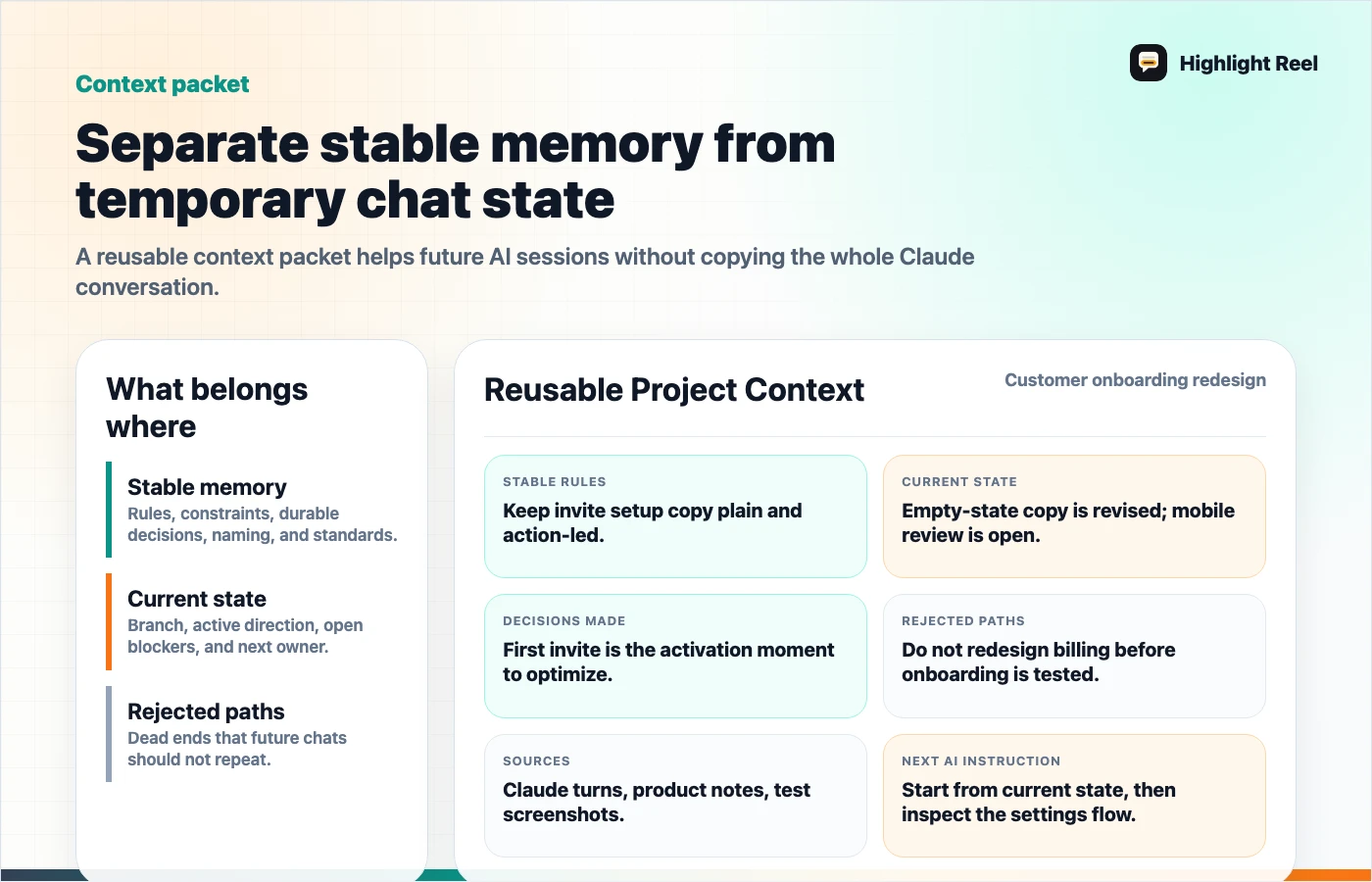
Download the Claude chat context packet anatomy
Scenario: A Long Planning Chat That Needs Memory
Imagine a product engineer used Claude to reason through a customer onboarding redesign. The chat includes:
- an audit of the current invite flow
- a few naming debates around roles and permissions
- a proposed first-run checklist
- references to GitHub issues
- two rejected onboarding options
- a final context summary
The engineer wants the next Claude chat, teammate, or coding assistant to start from the useful learning. They could share the Claude chat, but the teammate does not need every turn.
Anthropic's Claude Projects help describes projects as workspaces with chat histories and project knowledge. Anthropic's shared chat help describes shared chats as snapshots. Those platform features are useful, but the reusable context still needs editorial judgment.
Before: Long Claude Chat
Human:
Help me reorganize the docs around use cases.

Claude:
Here are three possible structures...

Human:
Option 2 seems too product-marketing heavy. Make it more task-based.

Claude:
Then use these groups: Compare, Templates, Use cases, Troubleshooting.

Human:
What should go into permanent project instructions?

Claude:
Store stable rules, not one-off findings...

Human:
Now draft a handoff for the next coding assistant.

Claude:
...
This chat has durable context, but it also has temporary thinking. Saving it all as project knowledge can make future sessions noisy.
After: Reusable Project Context
# Reusable Project Context: Customer Onboarding Redesign

## Stable rules for future AI sessions
- Explain roles before asking an admin to invite teammates.
- Keep the first-run flow under three required steps.
- Use customer language from reviewed support notes, not raw ticket text.
- Do not make quantified impact claims unless analytics support them.

## Current project state
The team is testing a shorter onboarding path for small teams. The next design
review needs a clear summary of the accepted direction, rejected options, and
open permission questions.

## Decisions made
| Decision | Reason |
| --- | --- |
| Show role choices before the invite is sent | Admins were confused about viewer vs editor access |
| Keep the first invite task simple | New teammates need one obvious next step |
| Move advanced permissions out of the first screen | The first run should explain enough without becoming setup documentation |

## Rejected paths
- Rejected: asking admins to configure every permission before inviting.
  Reason: it delayed the first useful action.
- Rejected: hiding role names until after the invite was sent.
  Reason: support notes showed that role confusion caused rework.

## Selected transcript worth preserving
- The turn where role labels were compared.
- The turn where the team rejected the full-permission setup screen.
- The turn where Claude summarized the open analytics question.

## Next action
Use this context packet before asking Claude Code, Codex, or another assistant
to draft the next issue, design note, or implementation plan.
The after version is not just shorter. It separates permanent context from session evidence.
What Belongs Where
| Material from the long Claude chat | Best destination |
|---|---|
| Stable rules that should guide many future chats | Claude Project instructions, ChatGPT Project instructions, project rules, or team docs |
| One-off analysis for this batch | Dated project note or Highlight Reel page |
| Selected transcript evidence | Clean share link or appendix |
| Current branch state or bug status | Issue, PR note, or session handoff |
| Rejected paths | Project context packet |
| Private scratch thinking | Do not share unless it truly helps |
The mistake is treating every useful sentence as permanent memory. Project context should be reusable, not bloated.
Context Packet Template
# Reusable Project Context

## Project

## Stable rules
- What should future AI sessions always follow?

## Current state
- What is true right now?

## Decisions made
| Decision | Reason | Date or source |
| --- | --- | --- |

## Rejected paths
- Rejected:
- Reason:
- Reconsider when:

## Source links or evidence
- Official docs:
- Internal docs:
- Selected transcript:

## Instructions for the next AI session
- Use:
- Avoid:
- Ask before:

## Next action
- Owner:
- Destination:
- Due:
This is the reusable layer between a long Claude chat and the next round of work.
How Shared Claude Chats Fit
A Claude shared chat can be useful when someone needs to inspect the conversation sequence. Anthropic's help page says a shared chat is a snapshot of the messages sent before sharing, and it has specific behavior for artifacts and attached files.
That is still different from a context packet. A shared chat preserves the conversation. A context packet tells the next person what to reuse.
How Claude Code GitHub Actions Fit
When the next destination is a GitHub issue or pull request, reusable project context becomes especially valuable. Claude Code GitHub Actions workflows can be triggered from GitHub collaboration surfaces, so the issue or PR needs a clear brief, not a vague link to a long chat.
Use the context packet to give the coding assistant:
- scope
- constraints
- relevant decisions
- files or docs to inspect
- verification expectations
- stop conditions
That is more useful than asking an agent to infer the project from a long transcript.
How Highlight Reel Fits
Highlight Reel helps preserve the selected transcript and context packet together. Save the turns that explain the decision, add stable rules and next actions, and share a clean page with the teammate or future agent.
The result is small enough to reuse and detailed enough to trust.
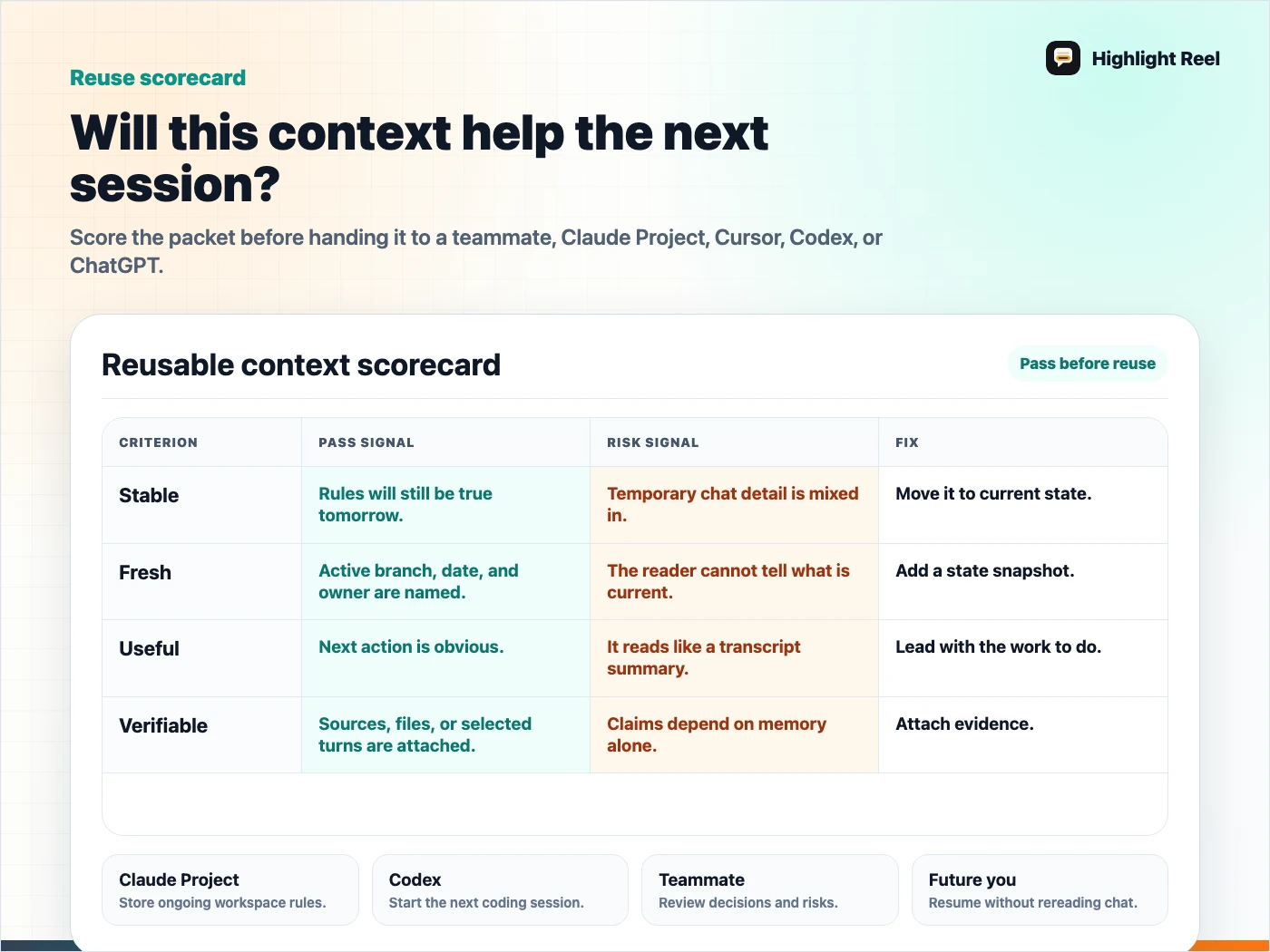
Download the reusable project context scorecard
FAQ
Should I put the whole Claude chat into Claude Project knowledge?
Usually not. Extract durable rules and decisions. Keep the full or selected transcript as evidence if it might be useful later.
Is this only for Claude?
No. The same pattern works for ChatGPT Projects, coding assistants, internal docs, and GitHub issues. Claude is the example because the source chat starts there.
Should I share the Claude chat or the context packet?
Share the context packet first. Add the shared chat only when the recipient needs to inspect the original sequence.