Messy Coding Assistant Session to Bug Report: A Realistic Example
A realistic fictional example of turning a messy coding assistant session into a useful bug report with reproduction steps, evidence, scope, and tasks.
May 13, 2026

A coding assistant session can solve part of a bug while leaving behind a messy trail: logs, guesses, rejected patches, command output, stack traces, and a final "probably fixed" summary.
Highlight Reel
Turn coding-agent sessions into useful bug reports
Save the root cause, selected transcript, commands, and next tasks as a clean handoff your team can inspect.
That trail is not a bug report yet.
This article shows a realistic fictional example of turning a messy coding assistant session into a useful bug report. It is an example, not a real customer story, incident report, or claim about a production system.
Use it when you need a coding assistant bug report, but the thing you actually have is a long Claude Code, Codex, Cursor, or ChatGPT debugging chat.
Quick Answer
A coding assistant bug report should include:
- expected behavior
- actual behavior
- reproduction steps
- affected area or files
- root-cause hypothesis
- evidence from the session
- rejected fixes or dead ends
- tasks that a human or agent can follow
- what still needs verification
The report should not include every assistant turn. It should preserve the debugging evidence that helps the next person continue.
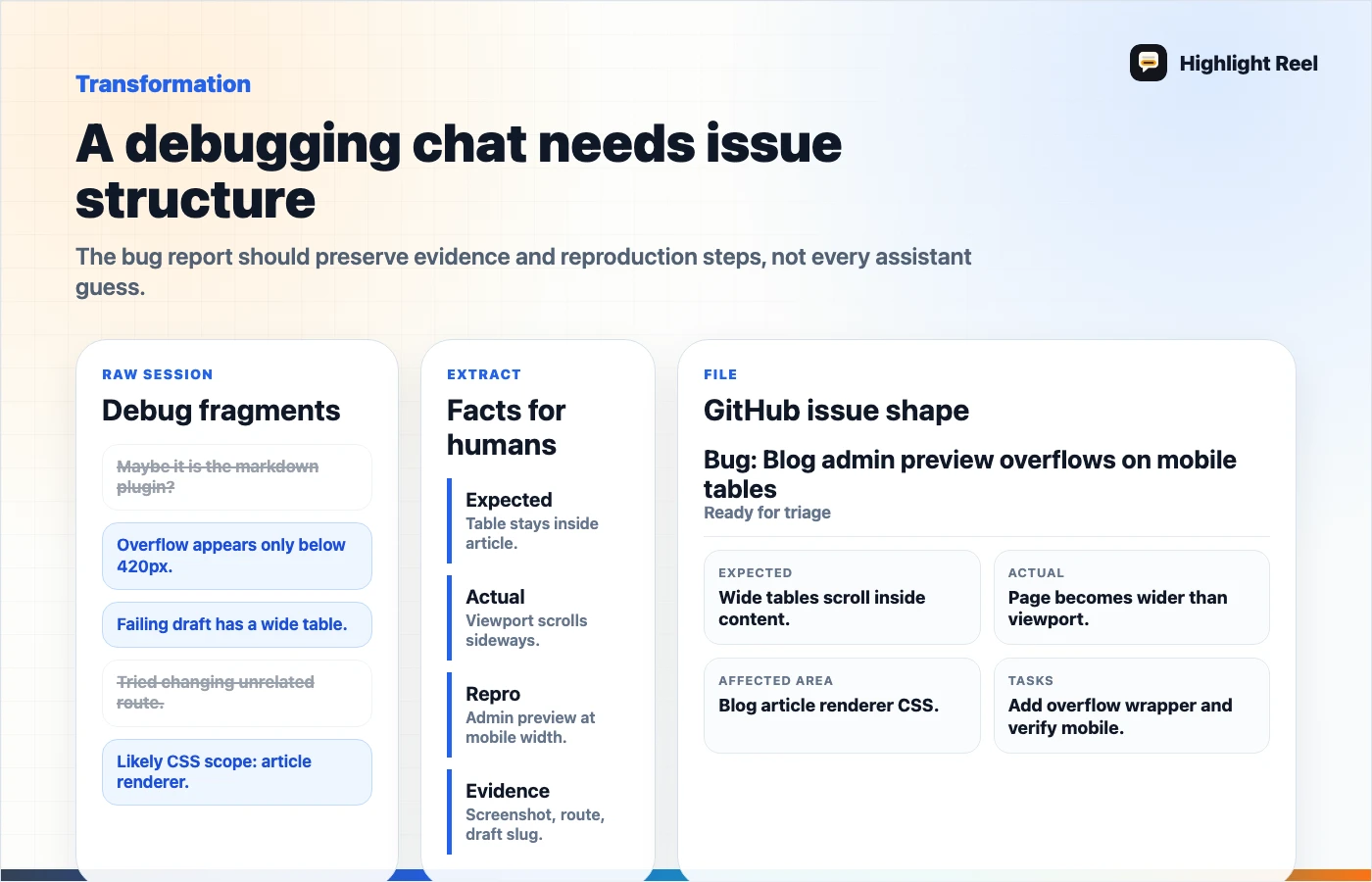
Download the coding session to bug report flow
Scenario: A Debugging Chat That Needs An Issue
Imagine a developer used a coding assistant to debug a bug in a blog admin preview. The preview looked fine on desktop but overflowed on mobile when a long table appeared.
The assistant inspected CSS, suggested three fixes, ran one test, and produced a patch idea. The session contains useful evidence, but the developer is not ready to implement. They need to open a GitHub issue for the next worker.
Claude Code GitHub Actions documentation describes workflows where Claude can operate from GitHub issues and pull requests. GitHub issues also render Markdown, code blocks, links, and task lists. That makes the issue body a natural destination for a cleaned debugging handoff.
Before: Messy Coding Assistant Session
Developer:
The blog preview overflows on mobile. Can you inspect?

Assistant:
Maybe the article shell has width: 100vw. Search CSS.

Tool output:
components/blog/blog-post-article.module.css...

Assistant:
The table wrapper may be missing overflow-x: auto.

Developer:
But only admin preview breaks, public page seems okay.

Assistant:
Then inspect preview container. Maybe nested card width.

Tool output:
test failed because env variable is missing...

Assistant:
Try CSS min-width: 0 on the preview container.

Developer:
Do not edit yet. I need a bug report for another worker.
This has clues, but it is not actionable. The next worker would need to reread the whole chat and decide which parts matter.
After: Bug Report
# Bug: Blog admin preview overflows on mobile tables

## Expected behavior
In admin preview mode, article content should fit within the mobile preview
container. Wide tables should scroll horizontally inside the article body
instead of causing the whole preview shell to overflow.

## Actual behavior
The mobile preview container becomes wider than the viewport when an article
contains a wide Markdown table.

## Reproduction steps
1. Open a draft article with a wide table in admin blog edit view.
2. Switch to Preview mode.
3. Set preview width to mobile.
4. Observe horizontal overflow around the article preview.

## Evidence from coding assistant session
- Public article rendering looked likely unrelated.
- The assistant flagged table wrapper overflow and preview container sizing as
  the two likely areas.
- The failed test run was blocked by local env, not by a confirmed app failure.

## Affected area to inspect
- `components/blog/blog-post-article.module.css`
- admin blog preview container styles
- Markdown table wrapper rendering

## Root-cause hypothesis
The table wrapper may be scrollable, but one preview parent may not allow
children to shrink. Check `min-width: 0`, `overflow-x`, and table wrapper
boundaries before changing article-wide layout.

## Tasks
- [ ] Reproduce in local admin preview with a draft containing a wide table.
- [ ] Confirm whether overflow is article renderer, admin preview shell, or both.
- [ ] Patch the smallest affected container.
- [ ] Add or update a rendering test for wide tables.
- [ ] Verify desktop and mobile preview widths.
The after version turns an AI debugging conversation into a bug report that another person or agent can actually use.
Transformation Checklist
| Messy session material | Bug report field |
|---|---|
| "It overflows on mobile" | Actual behavior |
| "It should fit the preview" | Expected behavior |
| Tool output and file names | Affected area |
| Assistant guesses | Root-cause hypothesis, clearly labeled |
| Failed commands | Evidence and limits |
| Possible fix ideas | Tasks |
| "Do not edit yet" | Scope boundary |
The most important move is labeling uncertainty. If the assistant guessed, call it a hypothesis. If a command failed because the environment was missing, do not present it as proof of the bug.
Bug Report Template
# Bug: <short user-visible problem>

## Expected behavior

## Actual behavior

## Reproduction steps
1.
2.
3.

## Evidence from AI coding session
- Relevant logs:
- Commands run:
- Files inspected:
- What changed the diagnosis:

## Affected area
- Files:
- Routes:
- Components:
- Data:

## Root-cause hypothesis

## Rejected paths
- Tried or considered:
- Why not:

## Tasks
- [ ] Reproduce locally.
- [ ] Patch the smallest affected area.
- [ ] Add or update tests.
- [ ] Verify with browser or logs.

## Still unknown
This template works for GitHub issues, Linear, Jira, or an internal engineering note. For GitHub, use Markdown headings, fenced code blocks, and normal checklist syntax so the report stays scannable.
What To Keep From The Coding Assistant
Keep:
- commands that were actually run
- error text that explains the bug
- file paths the assistant inspected
- root-cause reasoning that survived review
- rejected fixes and why they were rejected
- verification gaps
- next action
Remove:
- repeated tool narration
- wrong guesses that no longer matter
- unrelated logs
- secrets, tokens, private URLs, and customer data
- instructions that were temporary for the assistant only
Where Highlight Reel Fits
Highlight Reel helps when the useful debugging evidence is buried in a long AI coding session. You can save the selected turns, add a cleaned bug report header, and share a link in a GitHub issue or team ticket.
That gives the next worker the evidence without asking them to replay the whole assistant session.
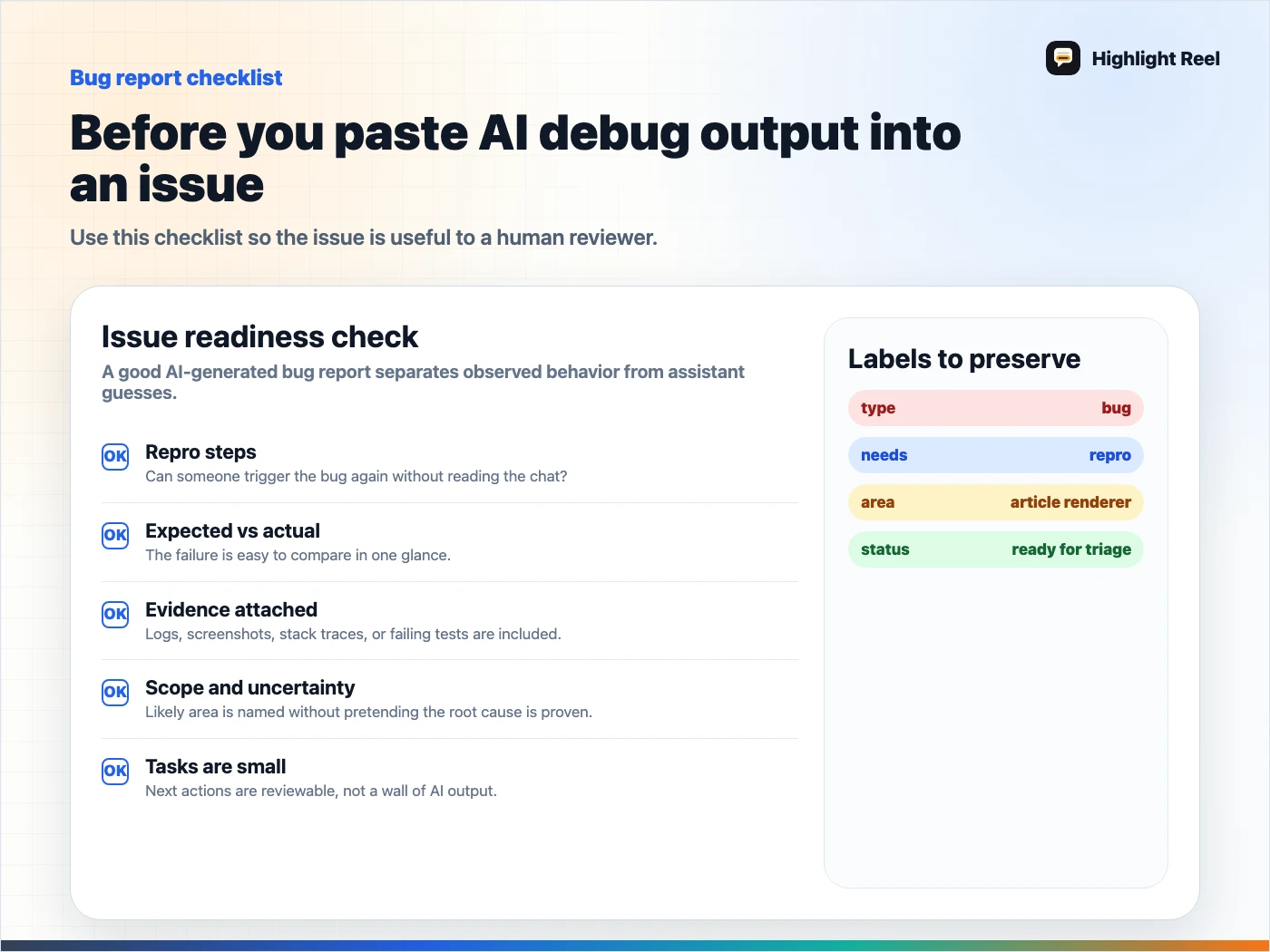
Download the AI debug report checklist
FAQ
Should I paste the entire coding assistant transcript into the issue?
Usually not. Paste the selected evidence, commands, files, and root-cause hypothesis. Link the cleaned transcript if the reviewer needs deeper context.
Can another AI agent use this bug report?
Yes. A clear bug report gives the agent boundaries, affected files, verification expectations, and the difference between evidence and guesses.
Should task lists go in the bug report?
They are useful when the next worker needs a small checklist. Keep tasks specific and verifiable instead of using a generic "fix bug" checkbox.