ChatGPT Apps vs MCP Servers vs Shared Links: How AI Gets Work Context
Compare ChatGPT apps, remote MCP servers, synced connectors, and shared links so your team can choose the right way to give AI useful work context.
May 13, 2026

Teams are starting to ask a new version of an old question: should we connect ChatGPT to our tools, build an MCP server, use a synced app, or just share the context manually?
Highlight Reel
Share reviewed context before you connect more tools
Turn important AI conversations into clean context links your team can inspect before using apps, connectors, or agents.
The answer depends on what kind of work context you are trying to move. A ChatGPT app or connector is useful when the model needs repeated access to an external system. A remote MCP server is useful when you own the tool surface and want a standard way to expose capabilities. A shared link or clean handoff is better when the context is one reviewed conversation, decision, or research packet.
Quick Answer
| Option | Best for | Context model | Setup cost | Main risk |
|---|---|---|---|---|
| ChatGPT app / connector | Searching or using approved third-party work apps | The AI can retrieve or act through an app path approved by the workspace or user | Medium | Users may assume "connected" means "understood" |
| Synced app | Finding information from files or systems already indexed for the user | Permission-aware retrieval from connected sources | Medium to high for teams | Stale or partial sync expectations |
| Remote MCP server | Exposing a custom tool, database, workflow, or internal system to AI | A public or authorized MCP endpoint describes tools and context | High | Tool permissions, write actions, and prompt injection need review |
| Native shared link | Showing the original AI conversation | A snapshot or platform-specific shared view | Low | May include too much context |
| Clean handoff link | Sharing a reviewed decision, research summary, or reusable context packet | Human-selected context in a readable page | Low | Requires a short cleanup step |
The practical rule: connect tools when the AI needs repeatable access; share a handoff when a human needs reviewed context.
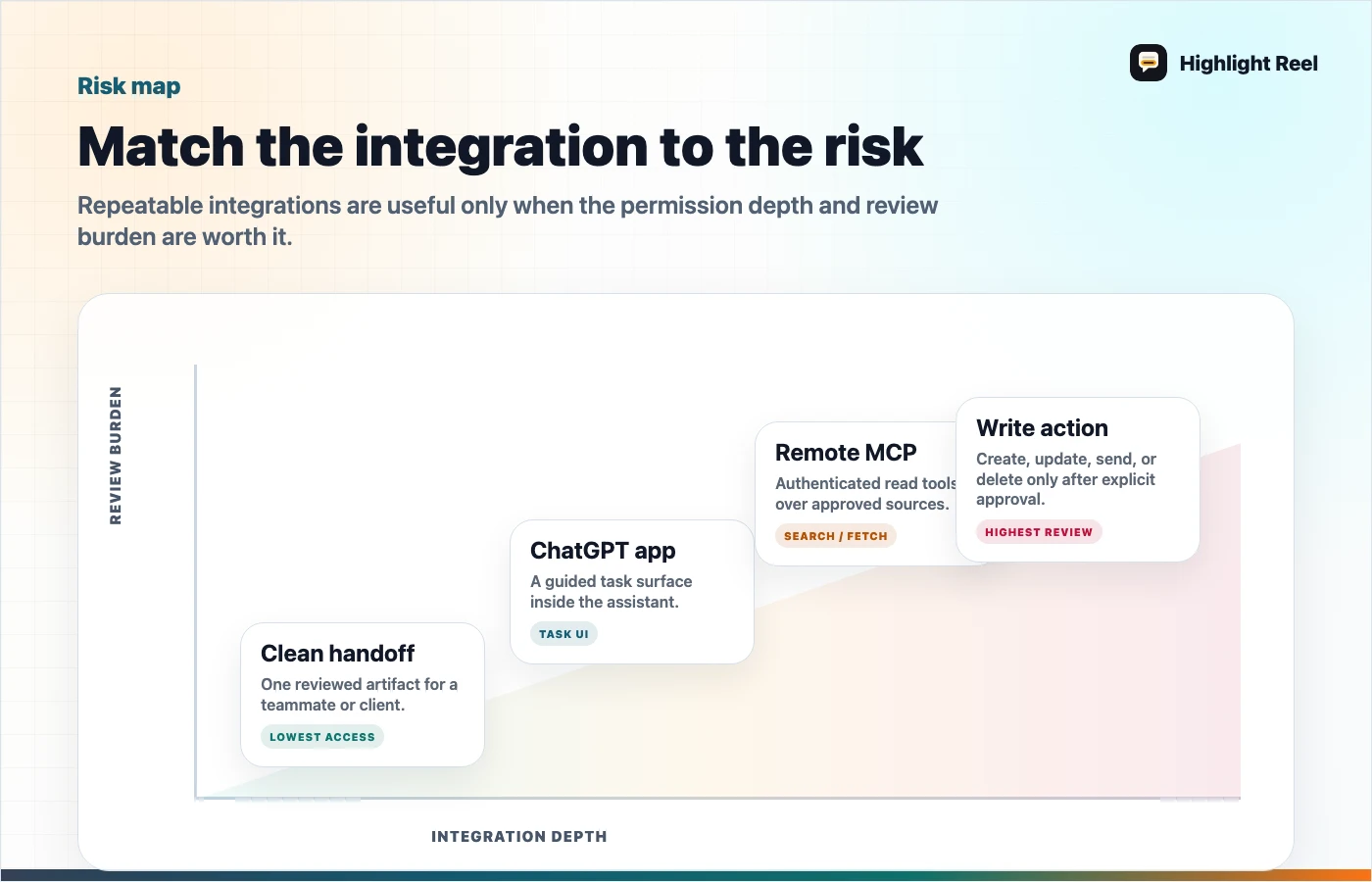
Download the ChatGPT apps versus MCP decision map
Plain-English Definitions
Use these definitions before you debate architecture:
- ChatGPT app: an app experience inside ChatGPT that can provide UI or actions around a task.
- Connector or synced app: an approved path for ChatGPT to search or reference information from a connected service, usually with user or workspace permissions.
- Remote MCP server: a server that exposes tools or context through the Model Context Protocol so an AI client can discover and call them.
- Shared link: a way to show one AI conversation or reviewed result to another person.
- Clean handoff: a human-selected summary, source trail, decision, and next action created from AI work.
If those still sound close, look at the verb: connectors retrieve, MCP servers expose tools, shared links show, and handoffs explain.
What ChatGPT Apps And Connectors Are Good At
ChatGPT apps and connectors are useful when the same external source matters repeatedly. If someone asks ChatGPT to find a file, summarize a project, or reference company knowledge, a connector can reduce copy-paste and context switching.
They are strongest when:
- the source system has permissions you trust
- the task happens repeatedly
- the AI needs to search across many items
- users should not manually paste sensitive files into each prompt
But connectors do not remove the need for human judgment. A retrieved file can still be outdated. A returned answer can still need review. A connected app can still produce a result that needs to be explained before a teammate acts on it.
What MCP Servers Are Good At
MCP is a standard way for applications to provide context and tools to language models. Anthropic describes MCP as a protocol for connecting AI models to data sources and tools, and OpenAI supports remote MCP servers and connectors in its own tooling.
MCP makes sense when:
- your team owns the tool or data source
- the AI should call specific tools, not just read pasted text
- you need a reusable integration surface
- you want multiple AI clients or agents to use the same tool description
The important word is tool. A remote MCP server is not just a better shared link. It can expose capabilities. That means teams need to review what the server can read, what it can write, who approves actions, and how outputs are logged.
MCP Connector Vs Shared Link: What Changes?
The easiest way to compare an MCP connector with a shared link is to ask what is moving.
| Scenario | What moves | Better fit |
|---|---|---|
| A teammate needs one reviewed AI chat | A selected conversation result | Shared link or clean handoff |
| ChatGPT should search approved Google Drive files | Permission-aware retrieval from a connected app | ChatGPT connector or synced app |
| An internal tool should expose highlight search, transcript fetch, or ticket lookup | Tool calls and structured context | Remote MCP server |
| A manager needs to understand what the AI work concluded | Summary, sources, decisions, and next actions | Clean handoff |
A shared link moves a conversation. A connector or MCP server gives the AI a repeatable path to read or act through a system. That is a much bigger commitment.
For example, a Google Drive connector may help ChatGPT find relevant files. A remote MCP server may let an AI client query an internal knowledge tool. A clean handoff only shares the reviewed output from one AI session. It is less powerful, but often safer and clearer when the job is simply "show this to another person."
What Shared Links Are Still Good At
Shared links are not obsolete. They are still useful when the original conversation is the artifact.
Use a shared link when:
- the recipient should inspect the original AI conversation
- the chat is short and safe
- you do not need repeatable access to a data source
- the task is one-time, not an integration
The problem appears when people use shared links as a substitute for documentation. A long AI thread may contain good work, but the link itself does not explain which turns matter, what decision was made, or what private context should be ignored.
Where Clean Handoffs Fit
A clean handoff sits between manual copy-paste and full integration.
It is useful when:
- one conversation produced a useful decision
- a teammate needs the result, not the entire tool connection
- the source chat includes private or irrelevant context
- the work should be readable in Slack, Notion, Linear, Jira, GitHub, or email
- you need a stable context packet before building an agent or connector
This is the layer Highlight Reel is built for. It helps turn messy AI work into a page another human can review before the team decides whether that work deserves automation.
Decision Questions
Ask these before choosing a method:
| Question | If yes | If no |
|---|---|---|
| Does AI need ongoing access to a system? | Consider an app, connector, or MCP server | Use a handoff or shared link |
| Is this a custom internal tool? | Consider MCP | Use an existing connector or manual context |
| Is there a write action? | Require approval, logging, and a review path | A read-only handoff may be enough |
| Does the teammate need the original conversation? | Shared link may work | Clean handoff is usually better |
| Is the current context messy or sensitive? | Clean it before sharing or connecting | Native sharing may be fine |
Before You Build Or Connect Anything
Use this approval table:
| If you are trying to... | Use first | Upgrade only when... |
|---|---|---|
| Share one research result | Clean handoff | The same query repeats weekly |
| Let AI search approved docs | Connector or synced app | Permissions and source freshness are clear |
| Let AI query an internal workflow | Remote MCP server | Tool owner, logs, and auth are defined |
| Let AI create or update records | Read-only handoff first | Approval, rollback, and audit logs exist |
Hard stop: if write actions are possible but approval or logging is unclear, keep the workflow read-only until that is fixed.
A Useful Default
For early teams, the safest default is:
- Capture the useful AI conversation.
- Clean it into a short handoff.
- Share the handoff with the team.
- Only build an app, connector, or MCP server if the same job repeats.
That sequence prevents tool sprawl. It also gives you better specs if you later decide to automate the workflow.
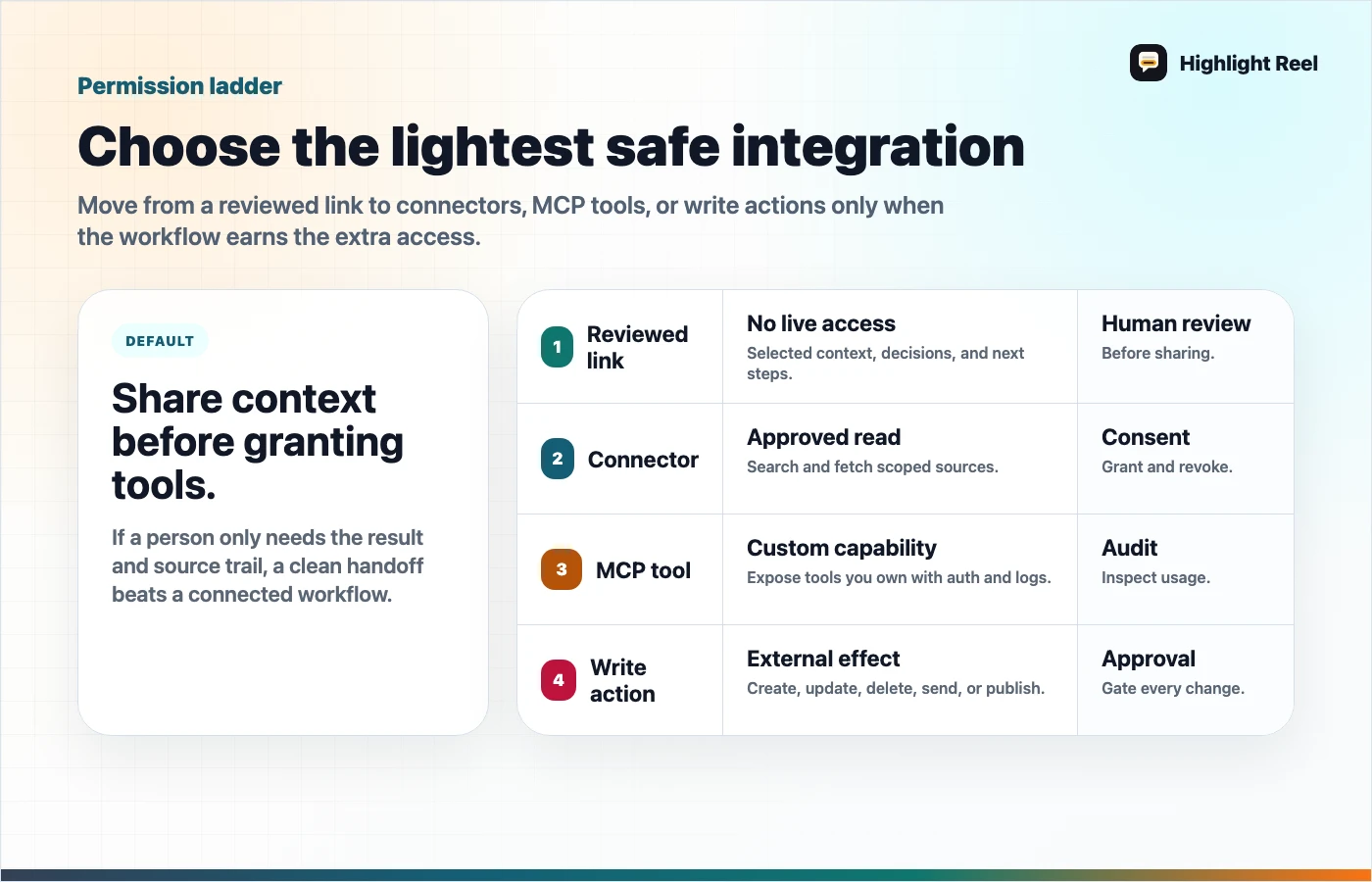
Download the AI integration permission ladder
FAQ
Is an MCP server the same as a ChatGPT connector?
No. A connector is a specific integration path. A remote MCP server is a server that implements the Model Context Protocol so an AI system can discover and call tools exposed by that server.
Should every useful AI chat become an MCP server?
No. Most useful AI chats should become notes, docs, tickets, or handoffs first. Build a connector only when the workflow repeats and the permission model is clear.
Why use a clean handoff if ChatGPT can connect to apps?
Because connected context is not the same as reviewed context. A teammate still needs to know what was decided, what sources matter, and what action to take.