What Is an MCP Connector? A Plain-English Guide for ChatGPT and Claude Users
A non-technical explanation of MCP connectors, how ChatGPT and Claude use them, and what to check before connecting an AI client to your saved work.
May 2, 2026
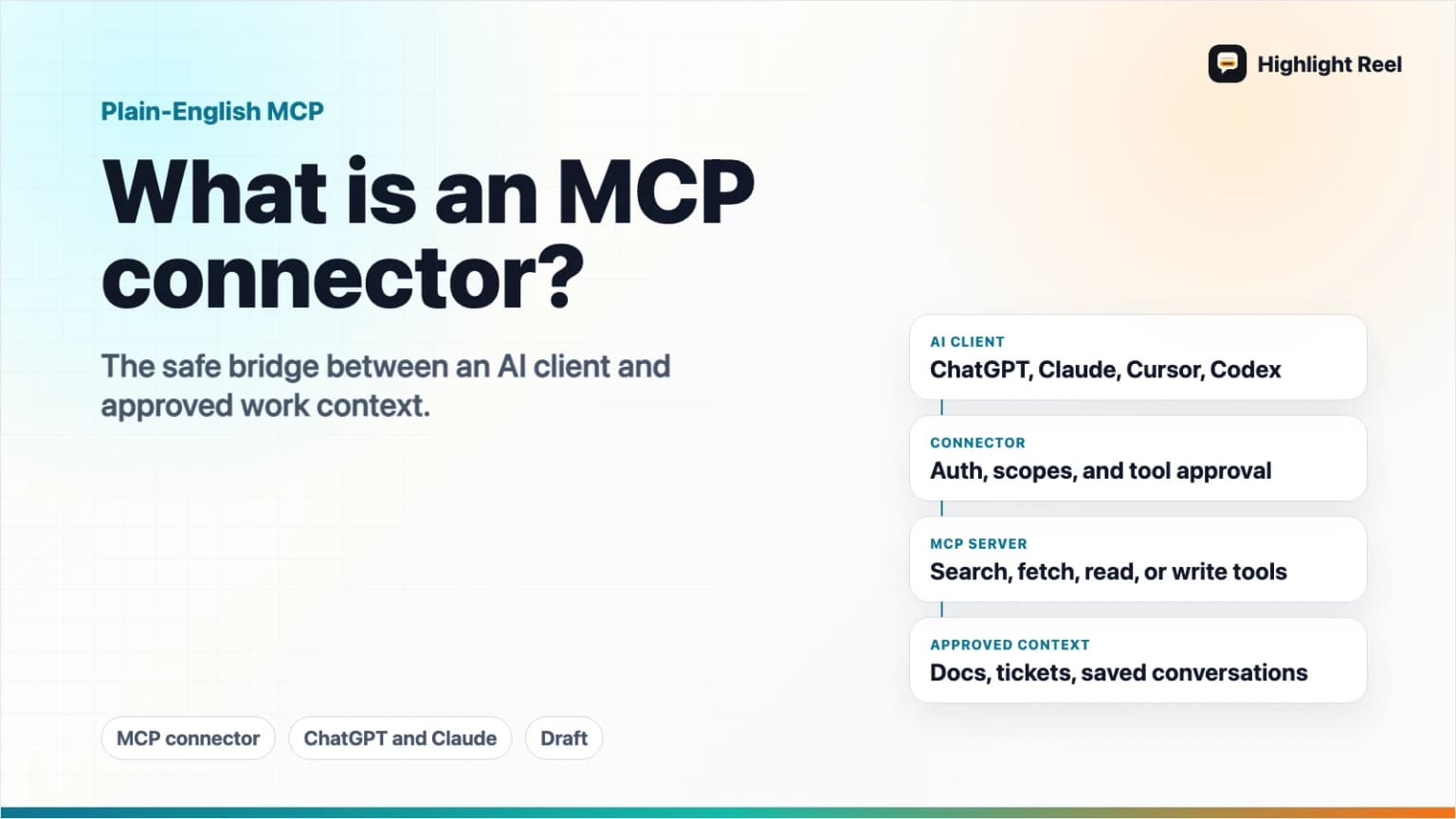
An MCP connector is a way to let an AI app, such as ChatGPT or Claude, safely reach outside the chat box and use approved information or tools. Instead of pasting the same background into every new conversation, you connect the AI client to a server that can search, fetch, or act on data you have permission to use.
Highlight Reel
Reuse the AI conversations worth keeping
Save useful Highlight Reel conversations once, then connect them as reusable context in supported AI clients through MCP.
For non-developers, the simplest mental model is this: MCP is a common connection language. A connector is the specific connection between your AI client and a service, workspace, database, file system, or saved conversation library.
Quick Answer
MCP stands for Model Context Protocol. It is an open standard for connecting AI applications to external systems, including data sources, tools, and reusable workflows.
An MCP connector usually has three parts:
| Part | Plain-English Meaning | Example |
|---|---|---|
| AI client | The app you are chatting with | ChatGPT, Claude, Claude Code, Cursor, Codex |
| MCP server | The service that exposes data or tools | A company docs server, a task system, Highlight Reel |
| Permissions | What the AI is allowed to read or change | Search saved transcripts, fetch a highlight, create a share page |
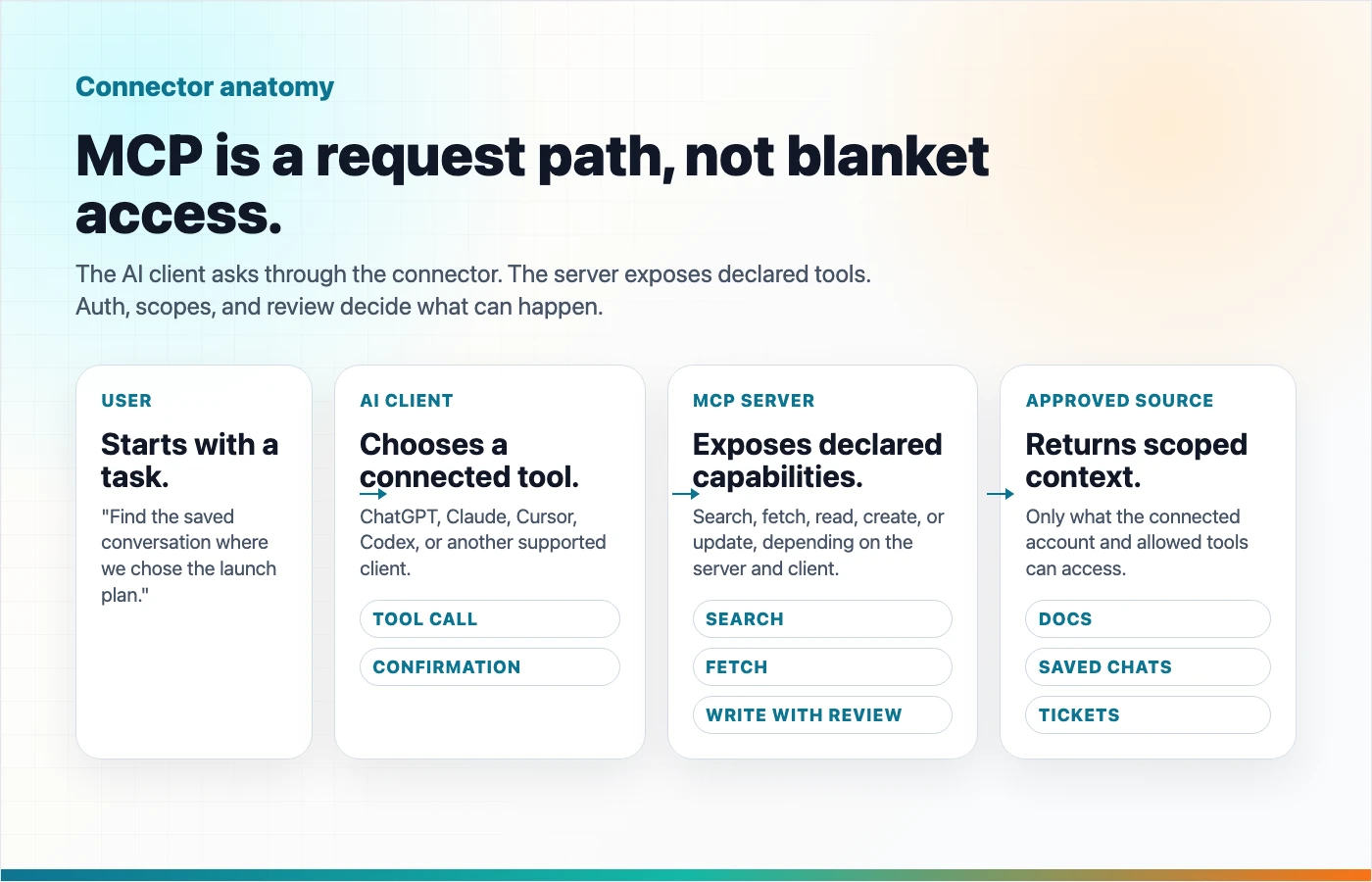
The important part: MCP does not magically give every AI app access to everything. The behavior depends on the AI client, the connector, authentication, permissions, and whether the client supports the relevant MCP features.
Why MCP Exists
AI conversations often lose context.
You may have already explained your project in one chat, researched a decision in another, and saved the final answer somewhere else. When you open a new AI conversation, the model usually does not know any of that unless you paste it again.
MCP is one answer to that problem. It gives AI clients a standard way to ask external systems for context or actions. The official MCP docs describe it as a standard for connecting AI applications to data sources, tools, and workflows.
That matters because it shifts the workflow from:
Copy context -> paste into AI -> repeat foreverto:
Connect approved source -> ask AI to search or use it -> review the resultIs "MCP Connector" the Same as "MCP Server"?
Not exactly.
People often say "MCP connector" because that is how the feature feels in ChatGPT or Claude: you connect an AI app to something useful. In the technical protocol, the service exposing capabilities is usually called an MCP server, and the AI app consuming those capabilities is the MCP client.
In everyday product language:
| Term You See | What It Usually Means |
|---|---|
| MCP | The protocol, or shared rules, for AI-tool connections |
| MCP server | The service exposing data or tools |
| MCP client | The AI app that can call those tools |
| MCP connector | The configured connection between the AI app and the server |
| ChatGPT app | OpenAI's current product naming for custom MCP-powered experiences |
| Claude custom connector | Anthropic's product naming for remote MCP connections in Claude |
OpenAI's current docs now use "apps" for many places where users previously saw "connectors." Searchers still use "ChatGPT MCP connector," but in the product UI and docs you may see "apps," "custom apps," or "MCP apps."
What Can an MCP Connector Do?
An MCP connector can expose different capabilities, depending on what the server supports and what the AI client allows.
Common patterns include:
| Capability | What It Lets The AI Do | Reader-Friendly Example |
|---|---|---|
| Search | Find relevant items from a connected source | "Find the saved conversation where we decided the pricing plan." |
| Fetch | Open a specific item in full | "Fetch the transcript behind this Highlight Reel page." |
| Read tools | Inspect data without changing it | "List recent project notes." |
| Write tools | Create or modify something | "Create a new share page from this summary." |
| Workflow tools | Trigger a defined action | "Open a task, send a draft, update a record." |
OpenAI's MCP guide notes that ChatGPT deep research and company knowledge rely on read-oriented search and fetch compatibility. OpenAI's developer mode docs also describe broader MCP access where other tools, including write actions, can be available subject to confirmation and settings.
Claude support depends on where you use Claude. Claude's API docs describe connecting to remote MCP servers through the Messages API. Claude's Help Center describes custom connectors in Claude and Claude Desktop. Claude Code also supports remote MCP servers and OAuth authentication for developer workflows.
What Happens When You Connect One?
A typical remote MCP flow looks like this:
- You add a connector URL in the AI client.
- The client checks what tools or data the server exposes.
- If authentication is required, you sign in or approve access.
- The AI client shows or enables the connector in a conversation.
- When you ask for something, the model may call an approved tool.
- You review the response, and for write actions you may need to confirm before anything changes.
OAuth is common for remote MCP servers because the connector needs to act on your behalf without asking for your password. The MCP authorization specification covers OAuth-based authorization for HTTP transports, while OpenAI and Anthropic both document OAuth-based patterns for remote connectors.
ChatGPT MCP: What To Know
In ChatGPT, the naming can be confusing because the product has moved from "connectors" language toward "apps."
For a user, the important points are:
- ChatGPT can connect to MCP-powered apps or custom apps when the plan, workspace settings, and client support allow it.
- OpenAI's developer mode docs describe full MCP client support for read and write tools in supported contexts.
- OpenAI's Help Center says write or modify actions show confirmation prompts before execution.
- ChatGPT company knowledge and deep research use read/fetch style access rather than arbitrary write actions.
- Workspace admins may control whether a custom app is allowed and who can use it.
So if someone says "ChatGPT MCP connector," they may mean one of several things: a read-only connector for knowledge retrieval, a custom MCP app in developer mode, or a workspace-approved app with controlled tools.
Claude MCP: What To Know
Claude has several MCP entry points.
Claude users may encounter:
- Custom connectors using remote MCP in Claude or Claude Desktop
- Claude Code MCP servers for developer work
- Claude API requests that include remote MCP servers through the Messages API
Anthropic's custom connector guidance emphasizes that users should connect only to trusted servers and review requested permissions. Its API docs also note that the MCP connector can call tools from remote MCP servers, and that API consumers handle OAuth token acquisition and refresh.
For everyday users, the practical takeaway is simple: Claude can use MCP to reach external tools and context, but the exact setup depends on whether you are using Claude web, Claude Desktop, Claude Code, or the API.
What Permissions Should You Check?
Before connecting any MCP server, ask these questions:
| Question | Why It Matters |
|---|---|
| Who built and hosts this connector? | Remote MCP servers can access or act on data you grant to them. |
| What data can it read? | Search access and full transcript access are not the same level of sensitivity. |
| Can it write, create, update, or delete? | Write tools deserve extra review because a model mistake can change real data. |
| Does the AI client ask for confirmation? | Confirmation prompts reduce accidental writes, but you still need to review payloads. |
| Can you revoke access later? | Good connector hygiene includes disconnecting stale tools. |
| Does your plan or workspace allow it? | Admin settings and product rollout status can change what is available. |
MCP is useful because it gives AI clients structured access. That is also why permissions matter. A connector should be treated like any other integration that can read or modify your work.
Where Highlight Reel Fits
Highlight Reel is built around a simple problem: useful AI conversations should not disappear inside chat history.
When you save conversations, highlights, and transcripts in Highlight Reel, they can become reusable context instead of one-off chat debris. Through the Highlight Reel MCP endpoint, supported AI clients can search saved conversations, fetch the useful artifact, and, where supported and approved, create new saved pages from AI work.
That means a future AI session can start with context you already saved:
"Search my saved Highlight Reel conversations for the product positioning notes,
then use the relevant transcript as context for this landing page draft."
The connector does not remove the need for judgment. Client support, authentication, user permissions, and tool approval still control what happens. But it gives your best AI conversations a better job: reusable context for the next AI tool.
Decision Guide: Do You Need an MCP Connector?
| Situation | Use MCP? | Better Default |
|---|---|---|
| You only need to share one answer with a teammate | Not necessarily | Clean share page or Markdown export |
| You repeatedly paste the same project context | Yes | Save the source once, then connect it |
| You need AI to search past conversations | Yes | Read-oriented MCP tools like search/fetch |
| You need AI to create or update records | Maybe | Use write tools only with explicit permissions and review |
| You are handling sensitive customer or internal data | Carefully | Start with least privilege, review scopes, and test read tools first |
| Your AI client does not support the connector yet | No | Use export, copy/paste, or native sharing until support is available |
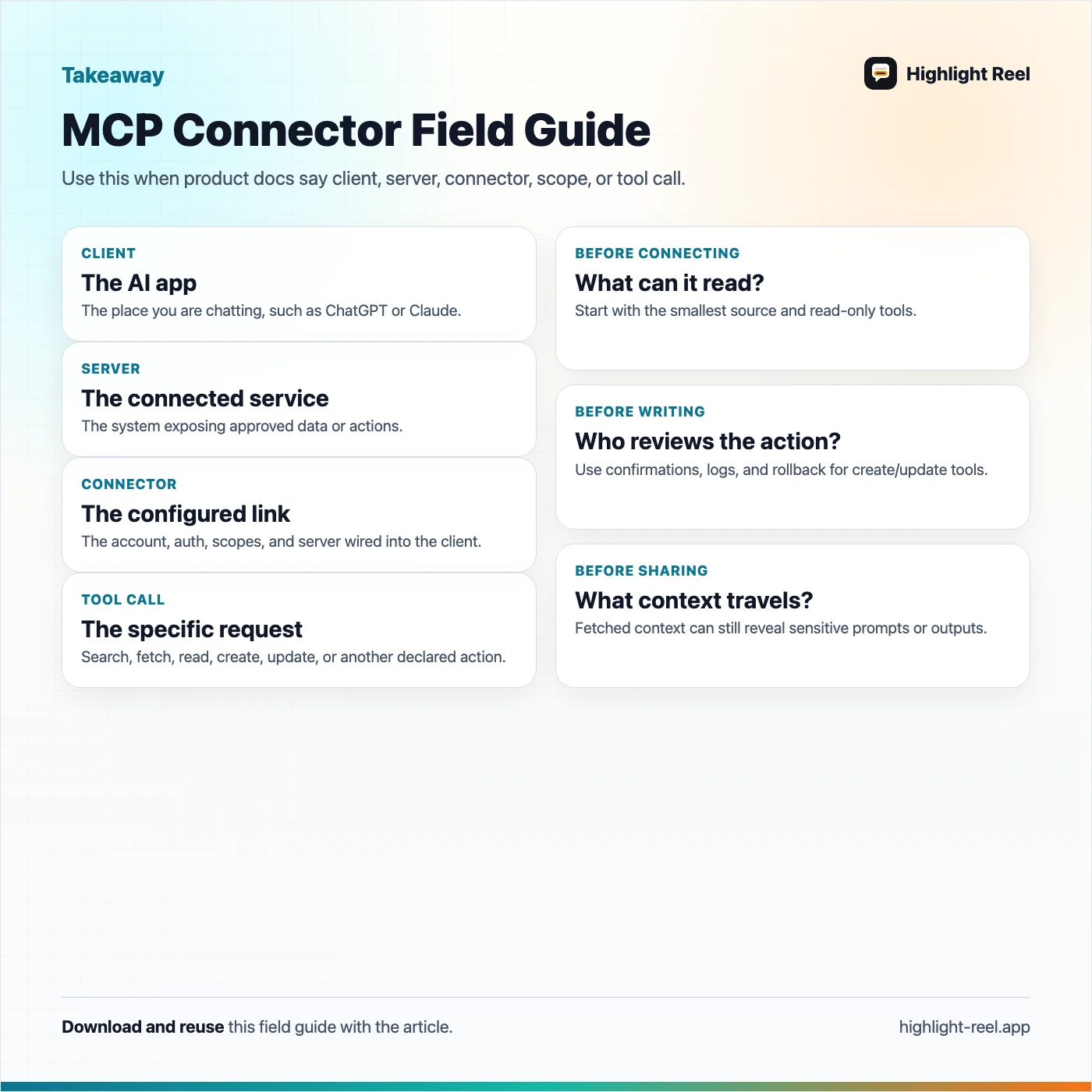
Download the MCP connector field guide
FAQ
Is MCP only for developers?
No. Developers build and configure many MCP servers, but the user value is not limited to developers. A non-technical user can benefit when an AI client connects to saved docs, project notes, or conversation history through a trusted connector.
Does MCP mean ChatGPT and Claude can see all my data?
No. MCP access depends on the connector, authentication, scopes, and the AI client's implementation. A well-designed connector should expose only the tools and data you authorize.
Are ChatGPT connectors and ChatGPT apps the same thing?
OpenAI's current docs increasingly use "apps" for custom MCP-powered experiences, while many users still search for "connectors." In practice, check the current ChatGPT UI and docs for the exact setup flow.
Can MCP connectors write or change data?
Some can. OpenAI's developer mode docs describe full MCP access that may include write tools, and its Help Center says ChatGPT shows confirmation prompts before write or modify actions. Always review the requested action before approving it.
Does Claude support MCP connectors?
Yes, but support varies by product surface. Claude web, Claude Desktop, Claude Code, and the Claude API have different setup paths and limitations. Check Anthropic's current docs for the client you use.
What is the safest way to start?
Start with a connector that only reads or searches. Confirm that results are useful, then consider create or update tools only when you understand the permissions and the client gives you a clear review step.
Bottom Line
An MCP connector turns an AI conversation from an isolated chat into part of a larger workflow. It can help ChatGPT, Claude, and other supported clients find the context or tools you approve.
For Highlight Reel users, the practical version is straightforward: save the conversations worth keeping, then reuse them as context through supported MCP clients when you need the next AI session to remember what already happened.