ChatGPT Connectors vs Claude Connectors vs Gemini Connected Apps
Compare ChatGPT apps and connectors, Claude connectors, and Gemini Connected Apps so your team can choose when to connect tools and when to share reviewed AI context instead.
May 13, 2026

ChatGPT apps and connectors, Claude connectors, and Gemini Connected Apps all help AI reach beyond a blank chat. Many readers still search for "ChatGPT connectors" or "Gemini extensions," but the current product language is shifting toward apps and connected apps. The practical difference is where the connection lives, what it can do, and how much cleanup a human still needs before sharing the result.
Highlight Reel
Clean the context before you connect more apps
Highlight Reel helps turn messy AI sessions into reviewed context links your team can inspect before approving connectors or extensions.
Use connectors when the AI needs repeatable access to approved tools or data. Use a clean handoff when a teammate needs the reviewed outcome of one AI session. Most teams need both, but not at the same moment.
Quick Answer
| Platform path | Best for | What to review first | When a clean handoff is better |
|---|---|---|---|
| ChatGPT connectors / apps | Searching, referencing, syncing, or acting through apps available in ChatGPT | App capability, workspace availability, user permissions, and whether the app can act | When you only need to share one decision or research result |
| Claude connectors | Letting Claude retrieve data or take actions in connected services, including MCP-based connectors | Read/write scope, action approvals, organization controls, and source-system permissions | When the output needs to move outside Claude |
| Gemini extensions / Connected Apps | Using Gemini with Google apps, device features, media apps, and supported third-party services | Account type, device, country, app availability, and permission prompts | When a teammate needs a portable note, not an app-specific response |
| Clean handoff | Moving selected AI context into Slack, Notion, GitHub, Linear, email, or another model | Redaction, sources, assumptions, and next action | When the job is one reviewed result, not repeatable tool access |
The useful rule: connect for repeated retrieval or action; hand off for reviewed communication.
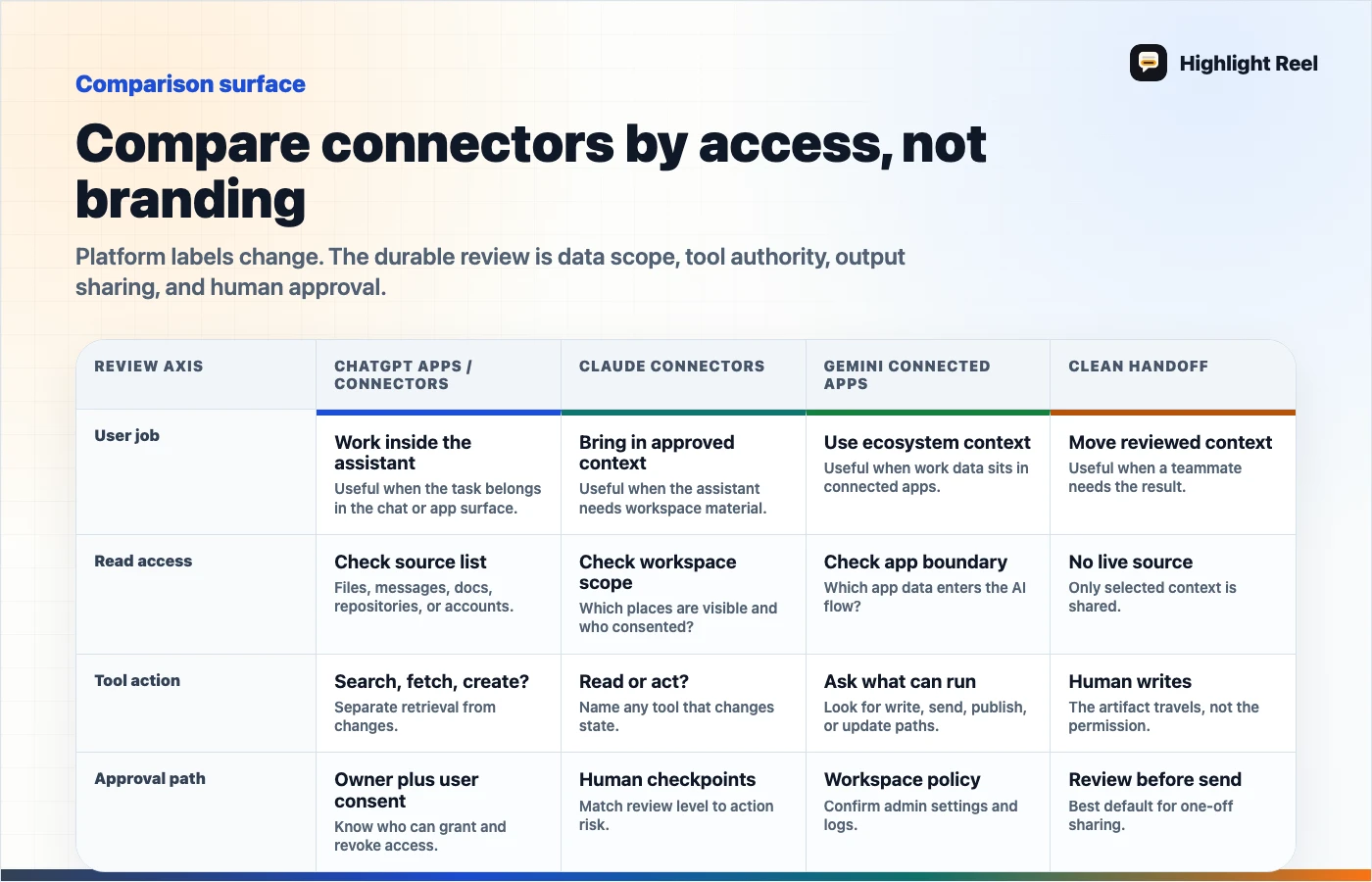
Download the AI connector comparison map
Why This Comparison Is Confusing
The product names keep changing. OpenAI's Help Center says connectors are now presented as apps in ChatGPT, with different capabilities such as file search, deep research, and sync. Claude uses connectors to let Claude access apps and services, retrieve data, and take actions within connected services. Google has moved the everyday user language toward Connected Apps in Gemini, even though many people still search for "Gemini extensions."
Those names sound similar, but the reader job is usually concrete:
- "Can ChatGPT search my files?"
- "Can Claude create a Linear issue?"
- "Can Gemini read my Gmail or Calendar?"
- "Should I send the whole AI chat to my teammate?"
- "Do we need an MCP connector or just a clean transcript?"
This article uses the common search terms first, then separates the actual workflow choice.
ChatGPT Connectors And Apps
ChatGPT apps and connectors are useful when ChatGPT needs approved access to an external source or service. OpenAI describes apps as ways to take actions, search and reference data sources, run deep research across sources with citations, or sync content so information is available on demand.
ChatGPT connectors are a strong fit when:
- the same source is needed repeatedly
- users should avoid pasting private files into every prompt
- the task needs search across a large workspace
- a connected app can retrieve the context more reliably than a human copy-paste
- the team has reviewed the app's capabilities and workspace policy
OpenAI's developer docs also describe connectors and remote MCP servers as ways to give models new capabilities. That is a more technical surface: it is about connecting the model to external services through OpenAI-maintained wrappers or remote MCP servers.
The important boundary: a connector can retrieve or act, but it does not automatically create a good teammate-facing summary. The final output may still need a clean handoff.
Claude Connectors
Claude connectors let Claude access apps and services, retrieve data, and take actions based on the user's permissions in the connected service. Claude's connector docs emphasize that source-system permissions still matter: if someone cannot access a file, channel, or record in the source system, the connector should not reach it from Claude either.
Claude connectors are a strong fit when:
- Claude should search approved services such as docs, issues, or messages
- the user wants Claude to take a tool action inside a connected service
- the organization wants action restrictions such as read-only, needs approval, or blocked
- a custom remote MCP connector would expose a workflow or internal tool
Claude's custom connector docs also warn that remote MCP connectors can access and take action in services, so teams should connect only trusted servers and review requested permissions carefully.
That makes Claude connectors powerful, but not casual. Before enabling broad write actions, the team should know what the connector can read, what it can change, and who reviews the outputs.
Gemini Extensions And Connected Apps
Gemini's user-facing help now centers on Connected Apps. Google says Gemini can connect to other apps to complete requests and, with permission, help with information and content in other apps. Examples include Gmail, Calendar, Docs, Drive, Keep, Tasks, Maps, YouTube, media apps, communication apps, device controls, and GitHub import in the Gemini web app.
Gemini Connected Apps are a strong fit when:
- the work already lives in Google services
- the user wants Gemini to operate across everyday personal or productivity apps
- the request depends on device, account, region, or app availability
- a notebook or NotebookLM workflow is part of the research process
Google's Gemini notebooks announcement adds another layer: notebooks can organize chats and files for complex projects, and notebooks sync across Gemini and NotebookLM. That is useful for ongoing research, but it is still not the same as a clean handoff to a teammate.
If the next person does not live in your Gemini or NotebookLM context, send a reviewed summary or source pack instead of assuming the workspace itself is the artifact.
Feature Comparison
| Need | ChatGPT connectors / apps | Claude connectors | Gemini extensions / Connected Apps | Clean handoff |
|---|---|---|---|---|
| Search connected files | Yes, depending on app and plan | Yes, depending on connector and permissions | Yes, depending on app and account | No, but can include selected sources |
| Take actions in services | Possible through apps, actions, or MCP surfaces | Possible with connector tool permissions and approvals | Possible for supported apps and devices | No |
| Build custom remote MCP surface | Supported in developer tooling | Supported in beta for custom connectors, subject to plan, workspace, and admin review | Not the default user concept | No |
| Share one reviewed result | Native shared links may help | Shared chats may help | App-specific sharing varies | Best fit |
| Preserve project reasoning | Project/workspace dependent | Project/chat dependent | Notebook/chat dependent | Best when human-curated |
| Move output into Notion or GitHub | Needs export or manual cleanup | Needs export or manual cleanup | Needs export or manual cleanup | Good fit with Markdown |
If a row says "possible," do not treat it as "approved." Availability, account type, admin settings, geography, and product changes can all affect what a user actually sees.
Connector Preflight Checklist
Use this before connecting any AI assistant to a work app:
| Check | Question | Pass condition |
|---|---|---|
| Purpose | What job will this connector repeat? | The job is specific and recurring |
| Scope | What can the AI read? | Sources are named and permission-bound |
| Actions | Can the AI write, delete, send, or trigger? | Write actions require approval or are disabled |
| Freshness | Does the source update often? | The team understands sync or retrieval behavior |
| Logging | Can someone review what happened? | Tool calls or outcomes are auditable |
| Handoff | Who needs the result after the AI finishes? | Output path is defined before use |
If the handoff row is blank, the connector may produce useful answers that still fail inside the team.
When To Use A Clean Handoff Instead
Use a clean handoff instead of a connector when:
- you are sharing one AI conversation
- the recipient does not need access to the source system
- the original chat includes private or irrelevant context
- the result should become a ticket, memo, README, or customer-facing note
- the team is still validating whether the workflow repeats
Highlight Reel belongs in this step. It helps turn long AI chats into readable pages and Markdown-friendly handoffs so teammates can review the outcome before anyone adds more app access.
That matters because connected AI can make context easier to retrieve, but it can also make oversharing easier. A handoff adds a human review layer.
Example: Research Handoff Across Tools
Suppose a product lead asks three AI tools to investigate a competitor:
| Stage | Tool path | Output problem |
|---|---|---|
| ChatGPT with connectors | Finds relevant docs and market notes | The answer references several sources but needs trimming |
| Claude with connectors | Summarizes issue tracker patterns | The tool outputs and reasoning are inside the Claude chat |
| Gemini with Connected Apps | Pulls Gmail and Drive context for a project | The context is tied to the user's Google account |
| Highlight Reel handoff | Packages findings, sources, assumptions, and next action | The teammate gets one reviewable artifact |
The connector did the retrieval. The handoff makes the result portable.
A Useful Default Policy
For team AI work, use this policy:
- Start with the smallest context path that solves the job.
- If one person needs to review one result, create a clean handoff.
- If the same person repeats the same workflow, consider a custom assistant or project.
- If the AI needs live access to systems, consider connectors.
- If the AI can write or trigger actions, require approval and logging.
This keeps connectors from becoming a substitute for documentation.
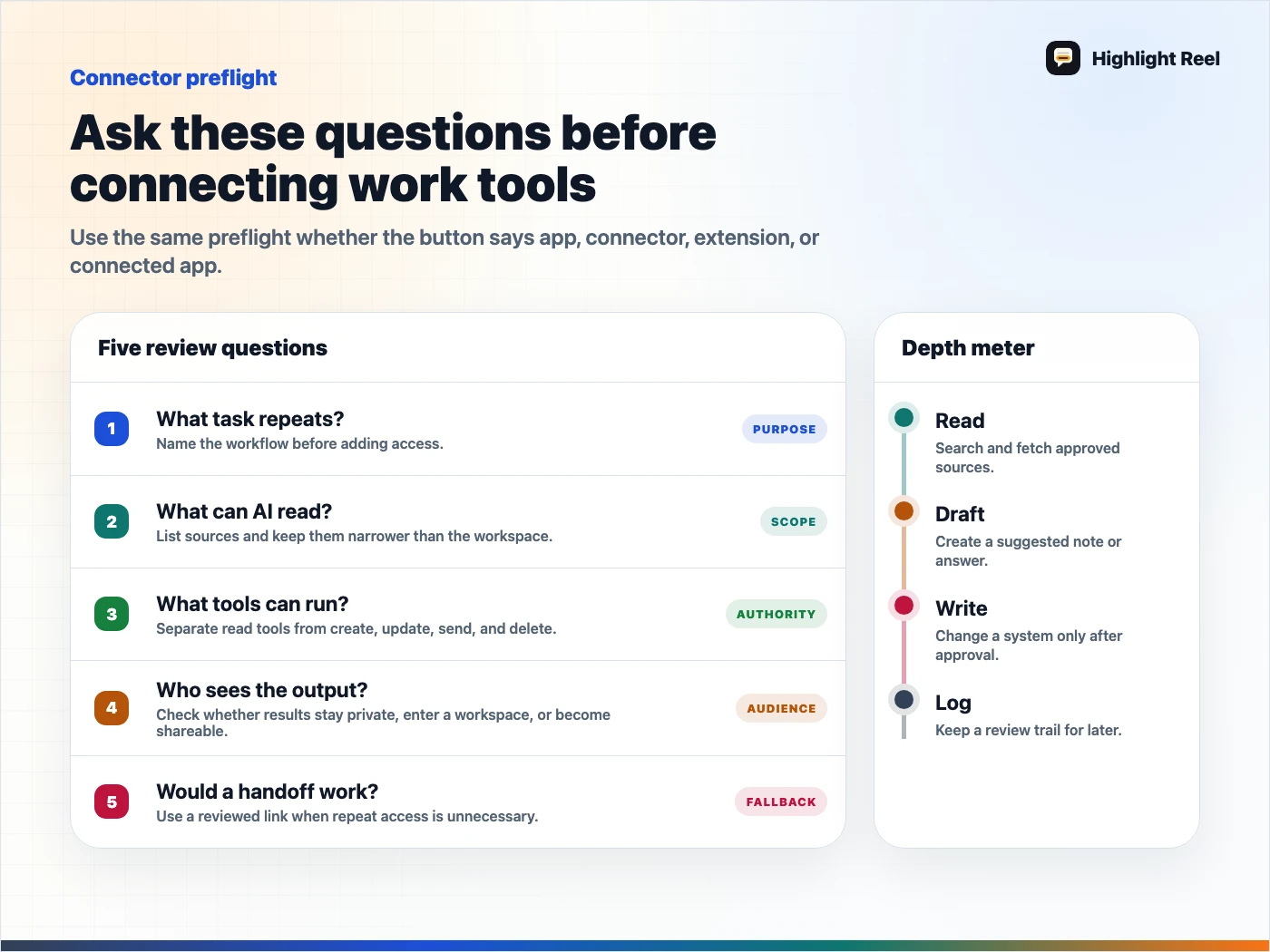
Download the AI connector preflight checklist
FAQ
Are ChatGPT connectors the same as ChatGPT apps?
OpenAI's Help Center says connectors are now presented as apps in ChatGPT. People still search for "ChatGPT connectors," but the product language may show apps with capabilities such as file search, deep research, or sync.
Are Claude connectors based on MCP?
Claude supports connectors and custom connectors using remote MCP. Not every reader needs to understand MCP to use a connector, but teams should understand the permission and action scope.
Are Gemini extensions still called extensions?
Many users still search for Gemini extensions, but Google's current help language emphasizes Connected Apps. The workflow idea is similar: Gemini can connect to supported apps with permission and availability constraints.
Which platform is safest?
The safer choice depends less on the brand and more on scope. A read-only, reviewed handoff is lower risk than a connector with broad write actions. Any connected app should be reviewed for permissions, availability, and intended use.
Where does Highlight Reel fit?
Highlight Reel is the bridge after useful AI work happens and before it spreads. It helps your team share selected context, sources, and next actions without sending every connected-app result or raw chat.