Claude Projects vs ChatGPT Projects vs Shared Chats: When To Send a Team Handoff
Compare Claude Projects, shared Claude chats, ChatGPT Projects, and clean handoff links so you know when to keep work inside an AI workspace and when to send a reviewed artifact to a teammate.
May 13, 2026

Claude Projects are best when the work should keep evolving inside Claude. A clean handoff is better when another person needs the useful result without inheriting every prompt, uploaded file, tangent, and private assumption behind it.
Highlight Reel
Turn AI project work into a clean handoff
Use Highlight Reel to extract the useful turns, sources, decisions, and next steps from long AI chats before you share them.
That difference matters because "share the project" and "share the outcome" are not the same job. Claude Projects can hold knowledge, instructions, and focused chats. Shared Claude chats can show a snapshot of one conversation. A clean handoff turns the important parts into a short, reviewable artifact your teammate can use in Slack, Notion, GitHub, Linear, email, or another AI tool.
Quick Answer
| Option | Use when | What the recipient gets | Watch out for |
|---|---|---|---|
| Claude Project | You need an ongoing workspace with files, instructions, and multiple focused chats | Access to the project context, depending on plan and permissions | The project may include more context than the recipient needs |
| Shared Claude chat | Someone should inspect one conversation snapshot | A link to messages that existed when the chat was shared | A raw chat still needs interpretation |
| ChatGPT Project | You work in ChatGPT and want files, instructions, chats, memory, and project sharing in one place | A live project context, depending on sharing settings | Shared workspace context is broader than a handoff |
| Clean handoff | A teammate needs the decision, sources, assumptions, and next action | A reviewed page or Markdown note | Requires a short cleanup pass |
The practical default: use Claude Projects to do the work; use a clean handoff to move the work.
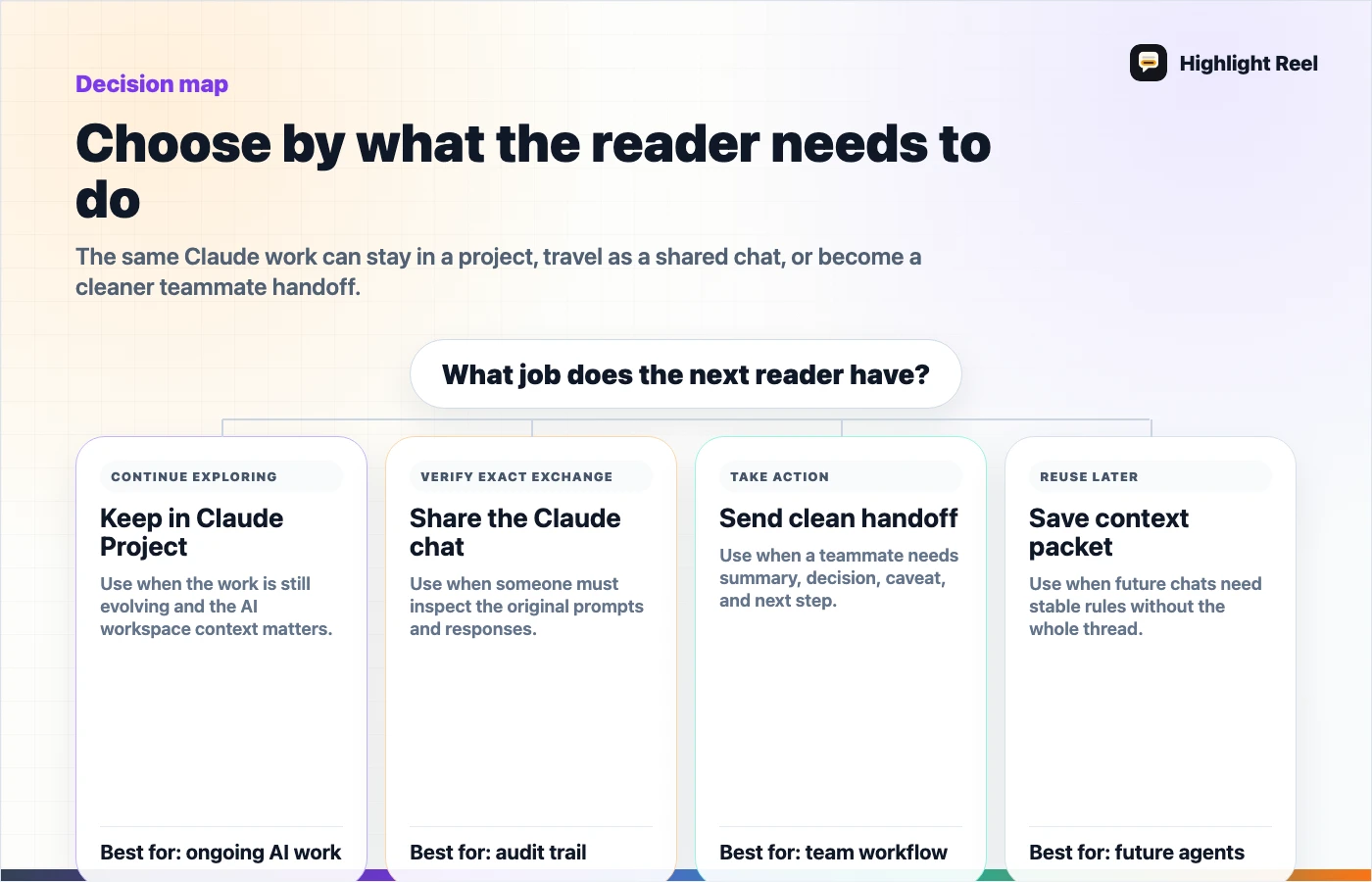
Download the Claude project handoff decision map
What Claude Projects Are For
Claude Projects are self-contained workspaces. In the official Claude Help description, a project can have its own chat history, knowledge base, uploaded documents, and project instructions. That makes Projects useful for long-running work where the AI should keep seeing the same context.
Claude Projects are a good fit when:
- you are working on a recurring research topic
- the same background documents should guide several chats
- the tone, role, or operating rules should stay consistent
- collaborators need to contribute inside the same Claude workspace
- the work is still exploratory and may branch into multiple conversations
For example, a product marketer might keep competitor notes, customer quotes, positioning rules, and launch instructions inside one Claude Project. That project can support multiple chats: one for messaging, one for sales enablement, one for FAQs, and one for launch risk.
That is exactly where a project is strong. It keeps the workbench intact.
What A Clean Handoff Is For
A clean handoff is not another AI workspace. It is the artifact you send after the workspace has produced something useful.
It usually includes:
- the problem the AI session was trying to solve
- the short answer or recommendation
- the source material that matters
- the assumptions that should not be hidden
- the decision or next action
- the parts of the chat that were intentionally omitted
Highlight Reel fits here as a workflow bridge. Instead of asking a teammate to read a long Claude conversation or join an entire project, you can turn the useful AI work into a clean page with the relevant context, then send that page as the handoff.
Claude Project Vs Clean Handoff
| Decision question | Choose Claude Project when... | Choose clean handoff when... |
|---|---|---|
| Is the work still active? | The team will keep asking Claude new questions | The useful result is ready to review |
| Does the recipient need all background files? | Yes, they need the workspace context | No, they need selected evidence and decisions |
| Will the AI use this context again? | Yes, repeated chats will reuse it | No, this is a one-time transfer |
| Is there private or messy context? | The recipient is trusted inside the workspace | The context needs trimming before sharing |
| What is the next action? | Continue working in Claude | Move the result to a teammate, doc, ticket, or repo |
A project is a working environment. A handoff is a deliverable.
Where Shared Claude Chats Fit
Claude shared chats are useful when the original conversation matters. Claude Help describes shared chats as snapshots: once a chat is shared, people with the link can view the snapshot of messages sent before sharing. Later messages are private by default unless the chat is unshared and shared again.
That is helpful for quick visibility, but it does not automatically create a good handoff.
Use a shared Claude chat when:
- the chat is short enough to read directly
- the recipient should inspect the original exchange
- the conversation does not include sensitive or irrelevant material
- a snapshot is enough and no one needs a polished next step
Use a clean handoff instead when:
- the chat is long
- the answer depends on scattered turns
- the recipient needs a decision, not a transcript
- the source conversation includes private prompts, internal notes, or dead ends
- the result should be reused in another system
Claude also notes that shared snapshots handle some attached-file and MCP-tool details differently from raw workspace access. That is useful, but it should not be treated as a substitute for human review. A safe snapshot can still be a confusing one.
The Pre-Send Checklist
Before sharing a Claude Project, shared chat, or clean handoff, run this checklist:
| Check | Why it matters | Better action if it fails |
|---|---|---|
| The recipient can tell what decision was made | Raw chats often hide the conclusion | Add a one-paragraph summary |
| The necessary sources are visible | AI outputs without source context are hard to trust | Add a source list or selected excerpts |
| Private context is removed | Projects and long chats can contain more than the recipient needs | Redact or create a clean handoff |
| Next action is explicit | Teammates should not guess what to do | Add an owner, date, or destination |
| The format matches the destination | Slack, Notion, GitHub, and email need different levels of detail | Convert to a short page or Markdown note |
If two or more checks fail, do not send the raw project or chat. Make a handoff first.
Example: Turning A Claude Project Result Into A Handoff
Imagine a Claude Project called "Q2 onboarding research." It contains:
- interview transcripts
- support notes
- product docs
- several chats about pain points
- project instructions for tone and target customer
After a week of work, the useful output is not the entire project. It is this:
| Handoff field | Example content |
|---|---|
| Context | "We reviewed onboarding feedback from new workspace admins." |
| Main finding | "Setup confusion is concentrated around permissions, not invite links." |
| Evidence | "Three interview notes and two support threads mention unclear role labels." |
| Decision needed | "Should we rename the first setup screen labels before launch?" |
| Next action | "Product and support review the proposed labels by Friday." |
| Omitted | "Raw transcripts, internal naming debate, and exploratory prompts." |
That is the artifact a teammate can act on. The Claude Project remains the workbench; the handoff becomes the shared result.
Where ChatGPT Projects Fit
ChatGPT Projects solve a similar workspace problem inside ChatGPT. OpenAI describes Projects as smart workspaces that group chats, files, and custom instructions so long-running work can stay organized. ChatGPT Projects can also support sharing, depending on account and workspace settings.
The same rule applies: a project is useful for ongoing work, but it is not always the right object to send.
If the recipient will keep collaborating inside ChatGPT, a shared ChatGPT Project may be useful. If they only need the outcome, a clean handoff is lighter, easier to scan, and easier to move into the tool where the work continues.
A Simple Decision Flow
Use this flow before you share AI project work:
- Is the recipient expected to continue the AI work inside the same workspace? Share the project if permissions and context are appropriate.
- Do they need to inspect the original conversation? Share a chat snapshot if the conversation is short and safe.
- Do they need a decision, source trail, or next action? Send a clean handoff.
- Will this result become a ticket, README, memo, or customer note? Send Markdown or a clean Highlight Reel page instead of a raw chat.
The more downstream the work is, the more valuable the handoff becomes.
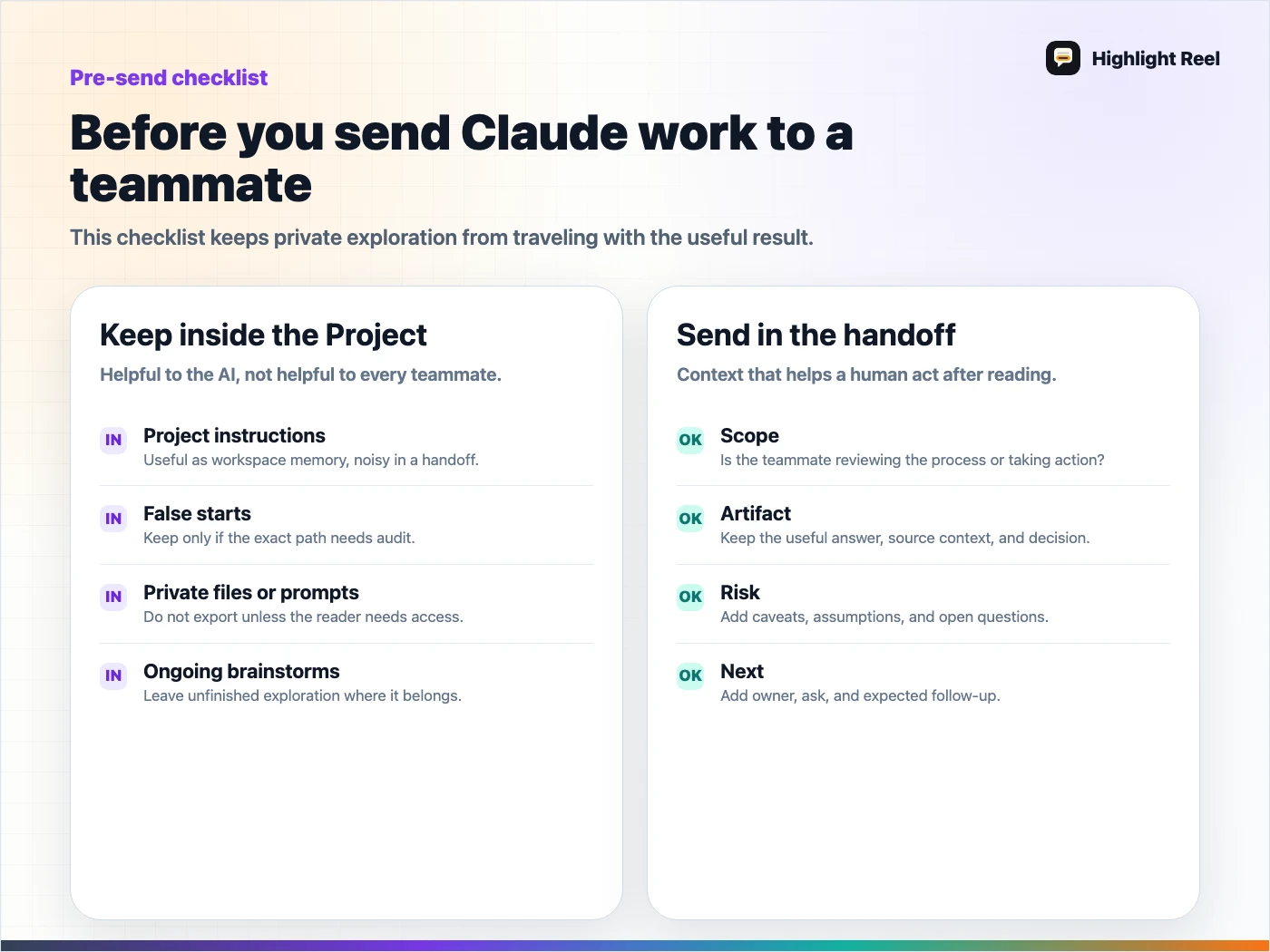
Download the Claude work pre-send checklist
FAQ
Is a Claude Project the same as a clean handoff?
No. A Claude Project is a workspace for doing ongoing work with Claude. A clean handoff is a reviewed artifact made from that work so another person can understand and act on it.
Should I share a Claude Project with my whole team?
Only when the team needs the project context and the permissions are appropriate. If the team only needs the conclusion, source trail, or next action, a clean handoff is usually clearer.
Is a shared Claude chat enough for project handoff?
Sometimes. A short chat can be enough if the answer and context are obvious. For long AI work, a shared chat often forces the recipient to reconstruct the point. A handoff does that work for them.
Where does Highlight Reel fit?
Highlight Reel helps turn long AI conversations into readable share links and Markdown-friendly handoffs. It does not replace Claude Projects; it gives you a cleaner way to move useful project work to people and systems outside the AI workspace.