MCP Connector vs Custom GPT vs Shared Transcript: Which One Does Your Team Need?
Compare MCP connectors, custom GPTs, and shared transcripts so teams can choose the right way to move AI context without overbuilding integrations.
May 13, 2026

An MCP connector, a custom GPT, and a shared transcript solve three different problems. An MCP connector gives AI repeatable access to external tools or data. A custom GPT packages instructions, knowledge, and optional capabilities for a recurring behavior. A shared transcript or clean handoff moves one reviewed conversation result to another person.
Highlight Reel
Share the useful context before you build the connector
Use Highlight Reel to turn long AI sessions into reviewed context links, source packs, and Markdown handoffs your team can inspect first.
The mistake is treating them as upgrades on the same ladder. They are not always "small, medium, large." They are different shapes of context.
Quick Answer
| Option | Best for | What it carries | Setup level | Default decision |
|---|---|---|---|---|
| MCP connector | Repeatable access to a system, API, database, or tool | Tool definitions, permissions, and live calls | High | Use when the AI needs to retrieve or act repeatedly |
| Custom GPT | A reusable assistant with specific instructions, knowledge, and capabilities | Behavior, uploaded knowledge, conversation starters, optional apps or actions | Medium | Use when the workflow is repeatable but does not require a full integration surface |
| Shared transcript | A one-time conversation result or reviewed source trail | Human-selected chat context, summary, sources, and next action | Low | Use when a person needs context, not tool access |
If the job is "let AI use this system every week," consider an MCP connector. If the job is "make the same assistant behave consistently," consider a custom GPT. If the job is "show this useful AI work to a teammate," share a transcript or clean handoff.
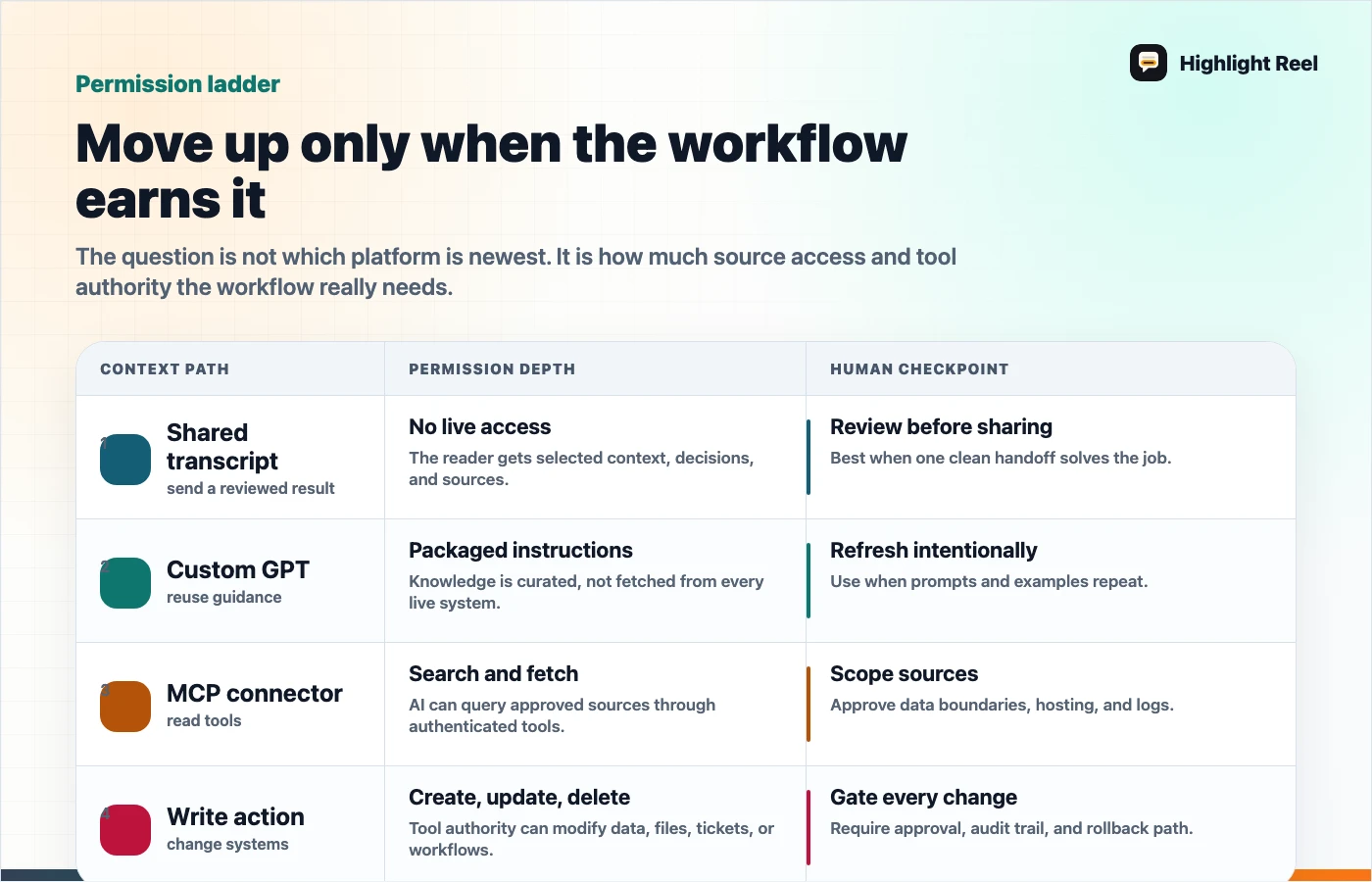
Download the MCP versus Custom GPT permission ladder
What An MCP Connector Is Good For
The Model Context Protocol is an open protocol for connecting AI systems to tools and data. OpenAI's MCP and connectors documentation describes connectors and remote MCP servers as ways to give models new capabilities. MCP servers can expose tools that a model can discover and call.
That makes MCP useful when the AI should operate against a real system:
- search a company knowledge base
- fetch a transcript or customer record
- create or update a ticket
- query an internal database
- call an approved workflow
- reuse the same tool surface from multiple AI clients
MCP is not just a sharing format. It is an integration contract. That means the review surface includes authentication, permissions, logging, tool descriptions, approval rules, and what happens when a tool can write or delete data.
What A Custom GPT Is Good For
A custom GPT is a packaged version of ChatGPT for a specific purpose. OpenAI's GPT creation docs describe configuration areas such as name, description, conversation starters, instructions, knowledge, capabilities, and actions.
Custom GPTs are a good fit when the repeatable part is behavior:
- a support triage assistant with a consistent rubric
- a content editor that follows a house style
- a research reviewer that uses a fixed checklist
- a planning assistant that asks the same intake questions
- a lightweight team tool that uses uploaded reference material
The important distinction: a custom GPT can have knowledge and capabilities, but it is still primarily a user-facing assistant configuration. It is not automatically the right answer when you need a durable integration between AI and an internal system.
What A Shared Transcript Is Good For
A shared transcript is the lightest option. It preserves the useful result of one AI conversation so another person can understand it.
That can mean:
- a native shared ChatGPT link
- a copied transcript
- a Markdown handoff
- a Highlight Reel page with selected turns, sources, and next actions
Shared transcripts are best when the context is already done enough to move. They are especially useful before a team commits to building an MCP connector or maintaining a custom GPT. You can use a handoff to prove the workflow has value before turning it into infrastructure.
Decision Matrix
| Reader question | MCP connector | Custom GPT | Shared transcript |
|---|---|---|---|
| Does AI need live access to a tool? | Yes | Sometimes, through apps or actions | No |
| Does the workflow repeat? | Usually | Yes | Maybe, but not required |
| Does a developer or admin need to review permissions? | Yes | Sometimes | Usually no |
| Is the artifact human-readable by default? | Not necessarily | The assistant is, but its setup may not be | Yes |
| Can it carry messy one-time context safely? | Poor fit | Poor fit | Good fit after cleanup |
| Does it create an integration maintenance burden? | Yes | Moderate | Low |
The simplest rule: do not build a connector for a conversation that only needed a handoff.
The Permission Ladder
Use this ladder before approving an AI context path:
| Level | Example | Review required |
|---|---|---|
| Read a reviewed transcript | Send a cleaned research summary | Redaction and source review |
| Reuse behavior | Create a custom GPT with instructions and examples | Prompt, knowledge, and sharing review |
| Search connected data | Use a connector to find files or records | Auth, source permissions, and data scope |
| Call tools | Let AI create issues, draft messages, or query APIs | Tool descriptions, approval flow, and logs |
| Write or delete | Let AI modify records or trigger workflows | Admin approval, rollback, reviewable activity log, and user confirmation |
Most teams should move up this ladder slowly. The lower levels often solve the communication problem without creating an integration problem.
Example: Support Feedback Workflow
Imagine a support lead used ChatGPT to analyze a small sample of anonymized customer conversation snippets. The AI produced a useful categorization of onboarding complaints. This is a fictional placeholder example, not a real customer story or metric.
Here are three possible next steps:
| Need | Better choice | Why |
|---|---|---|
| Send the insight to product this afternoon | Shared transcript or clean handoff | Product needs findings, examples, and next action |
| Reuse the same triage rubric every Friday | Custom GPT | The repeatable value is the rubric and response format |
| Let AI search support tickets and create Linear issues | MCP connector | The AI needs live access and tool calls |
The same workflow can mature over time. Start with a handoff. If the pattern repeats, package the behavior. If the tool access becomes necessary, build or approve a connector.
Custom GPT Vs MCP Connector
Teams often ask whether a custom GPT can replace an MCP connector. Sometimes it can delay the need for one, but it does not erase the difference.
| Use a custom GPT when... | Use an MCP connector when... |
|---|---|
| The assistant needs stable instructions | The assistant needs live tool access |
| Uploaded knowledge is enough | The source changes often or is too large to upload |
| A human will paste or share context | The AI must retrieve context itself |
| Output consistency is the main problem | System integration is the main problem |
| You can test in a single ChatGPT surface | You need a standard tool interface across clients |
OpenAI's GPT docs also note that GPTs can use capabilities and actions depending on configuration and availability. That does not mean every custom GPT should become a tool-heavy assistant. The more external capability you add, the closer you get to connector-level review.
Shared Transcript Vs Custom GPT
A shared transcript is evidence. A custom GPT is a reusable assistant.
Use a shared transcript when:
- you need to show what happened in one session
- the context is specific to one project
- the output should become a note, ticket, README, or memo
- the recipient is a human who needs to review the result
Use a custom GPT when:
- the same behavior should happen again
- the workflow needs a stable instruction set
- examples and reference files improve repeatability
- users should start from guided prompts instead of a blank chat
Do not turn every good transcript into a GPT. First ask whether the value came from a reusable method or from one specific conversation.
Shared Transcript Vs MCP Connector
A shared transcript moves selected context. An MCP connector opens a path to tools or data.
That is a very different risk profile.
Before building an MCP connector, write a one-page context handoff that answers:
| Field | Question |
|---|---|
| Workflow | What job is the AI expected to repeat? |
| Source | Which system must it read or call? |
| Tool scope | Which actions are read-only, write, or destructive? |
| Approval | Which actions need explicit human confirmation? |
| Logging | Where will calls and outputs be reviewed? |
| Fallback | What should the user do when the connector is unavailable? |
If you cannot fill this out, the team is not ready for a connector. Use a transcript or custom GPT until the workflow is clearer.
A Reusable Decision Template
Copy this into a planning doc before choosing the format:
## AI Context Decision

Main comparison:
MCP connector / custom GPT / shared transcript

Workflow:

Who needs the context:

How often this repeats:

Does AI need live data or tools?

Is uploaded/static knowledge enough?

Does a human need to review the result first?

Recommended format:

Why:

Permission notes:

Next test:
This template is intentionally small. The goal is to avoid turning a handoff problem into an architecture project.
Where Highlight Reel Fits
Highlight Reel is useful before the team builds anything heavier. It helps you turn long AI chats into clean pages and Markdown-friendly handoffs with the useful context, source trail, assumptions, and next action.
That gives you two benefits:
- your team can use the result immediately
- your future connector or custom GPT has a better spec
A clean handoff is not less serious than an integration. It is often the first artifact that proves the integration is worth building.
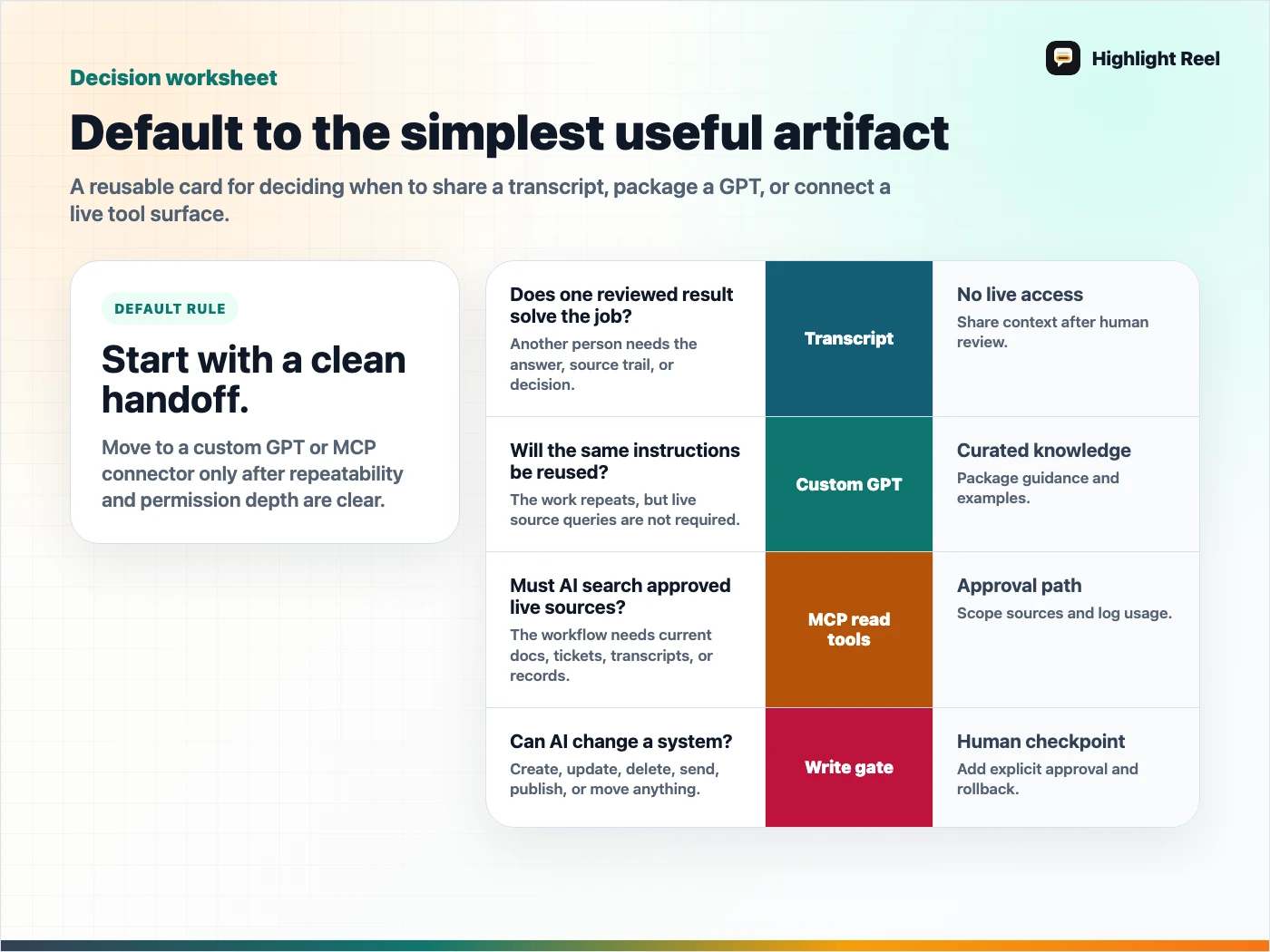
Download the MCP versus Custom GPT decision card
FAQ
Is an MCP connector the same as a custom GPT action?
No. They can both connect AI to external systems, but they are configured and governed differently. MCP is a protocol and integration surface. A custom GPT is a ChatGPT assistant configuration that may include capabilities or actions.
Should I build an MCP connector before making a custom GPT?
Only if live tool access is the core requirement. If the main need is consistent behavior, start with a custom GPT or even a clean transcript template.
Is a shared transcript secure enough?
It depends on what is included. A raw shared link may expose more context than intended. A clean handoff is safer when someone reviews, trims, and labels the context before sharing.
When should a transcript become infrastructure?
When the same job repeats, the source system is clear, permissions are understood, and manual handoffs have become the bottleneck.