How to Redact an AI Conversation Before Sharing It
A practical redaction workflow for cleaning an AI chat before you send it to coworkers, clients, or the public.
April 27, 2026
Redact an AI conversation before sharing it by removing secrets, personal details, customer context, private links, internal file paths, and any turn the reader does not need. Then reread the cleaned version as if it could be forwarded outside the original audience.
Highlight Reel
Clean up the useful AI turns before you share
Paste the conversation, trim the noise, review every detail, and turn the safe parts into a readable link.
Highlight Reel can help turn selected AI turns into a cleaner shareable page, but it is not automatic redaction, compliance review, or a substitute for your own judgment. You still need to review the conversation and remove sensitive information before sending the link.
Quick Answer
Before sharing an AI conversation:
- Decide who will read it and what they need.
- Keep only the prompt, constraints, corrections, and answer that matter.
- Remove secrets, credentials, private documents, personal details, customer names, internal URLs, and confidential business context.
- Replace necessary context with neutral placeholders.
- Preserve useful structure as real text, not screenshots.
- Read the final version once more before sending.
Do not assume a native shared link is already safe. OpenAI's shared links FAQ says a ChatGPT shared link can include the conversation history up to the point it was shared, and anyone with access to the link can view it. Anthropic's Claude sharing documentation describes shared chats as snapshots that include messages sent before sharing. That is useful, but it is not the same thing as a redaction pass.
For a stricter review lens, borrow from security and privacy guidance rather than only AI platform docs. NIST's PII guidance is useful for thinking about names, account details, and context that can identify a person. OWASP's secrets guidance is useful for remembering that API keys, tokens, credentials, and private keys are not just "details"; they are live access material.
What Redaction Means For An AI Chat
Redaction means deliberately removing or rewriting information that should not travel with the conversation.
For AI chats, that usually means two kinds of cleanup:
| Cleanup type | What it removes | Example of the decision |
|---|---|---|
| Safety cleanup | Sensitive details that should not be shared | Remove a token, customer name, private URL, or confidential document excerpt |
| Reader cleanup | Noise that makes the handoff harder to use | Remove abandoned branches, repeated prompts, or model mistakes that do not affect the final answer |
Both matter. A safe transcript can still be unusable if it includes every detour. A readable transcript can still be risky if it leaves private context inside the prompt.
Redaction Checklist Before Sharing
Use this checklist before you send an AI chat link to a coworker, client, community, or public page.
| Check | Remove or rewrite | Why it matters |
|---|---|---|
| Secrets and credentials | API keys, tokens, passwords, private keys, login details | Treat these as access material, not text. OWASP's secrets guidance is a useful baseline here. |
| Personal information | Names, emails, phone numbers, addresses, account details | NIST's PII guidance is a good reminder that seemingly small details can identify a person in context. |
| Customer or vendor context | Company names, contract terms, support history, implementation notes | A useful example can become an accidental disclosure. |
| Internal systems | Private URLs, ticket links, repo paths, file paths, dashboards | These can reveal systems, naming, or operational context. |
| Confidential business details | Roadmap, pricing, unreleased launches, strategy notes | AI chats often contain work-in-progress thinking. |
| Sensitive categories | Financial records, health information, HR details, legal materials | Anthropic's help docs specifically warn users to be thoughtful with highly sensitive personal details. |
| Private source material | Pasted docs, emails, meeting notes, transcripts, contracts | If the source should not be redistributed, the AI chat should not redistribute it either. |
| Irrelevant turns | False starts, repeated prompts, discarded options | Redaction is also about reducing what the reader has to inspect. |
| Model output that reveals private input | Summaries, tables, or examples derived from private details | Removing the prompt is not enough if the answer repeats the sensitive information. |
If you are unsure whether a detail belongs, remove it or replace it with a neutral placeholder.
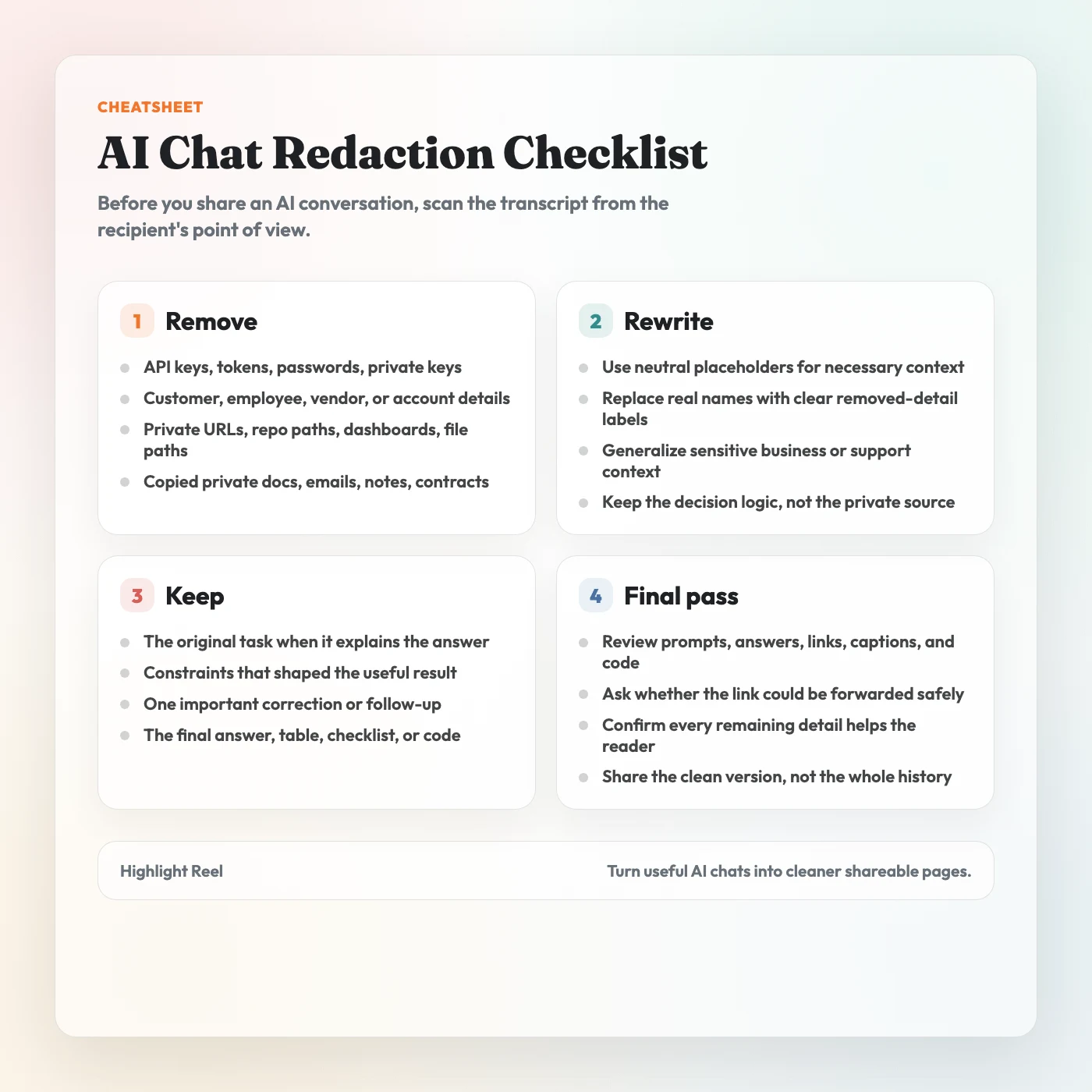
Download the AI chat redaction checklist
A Simple Redaction Workflow
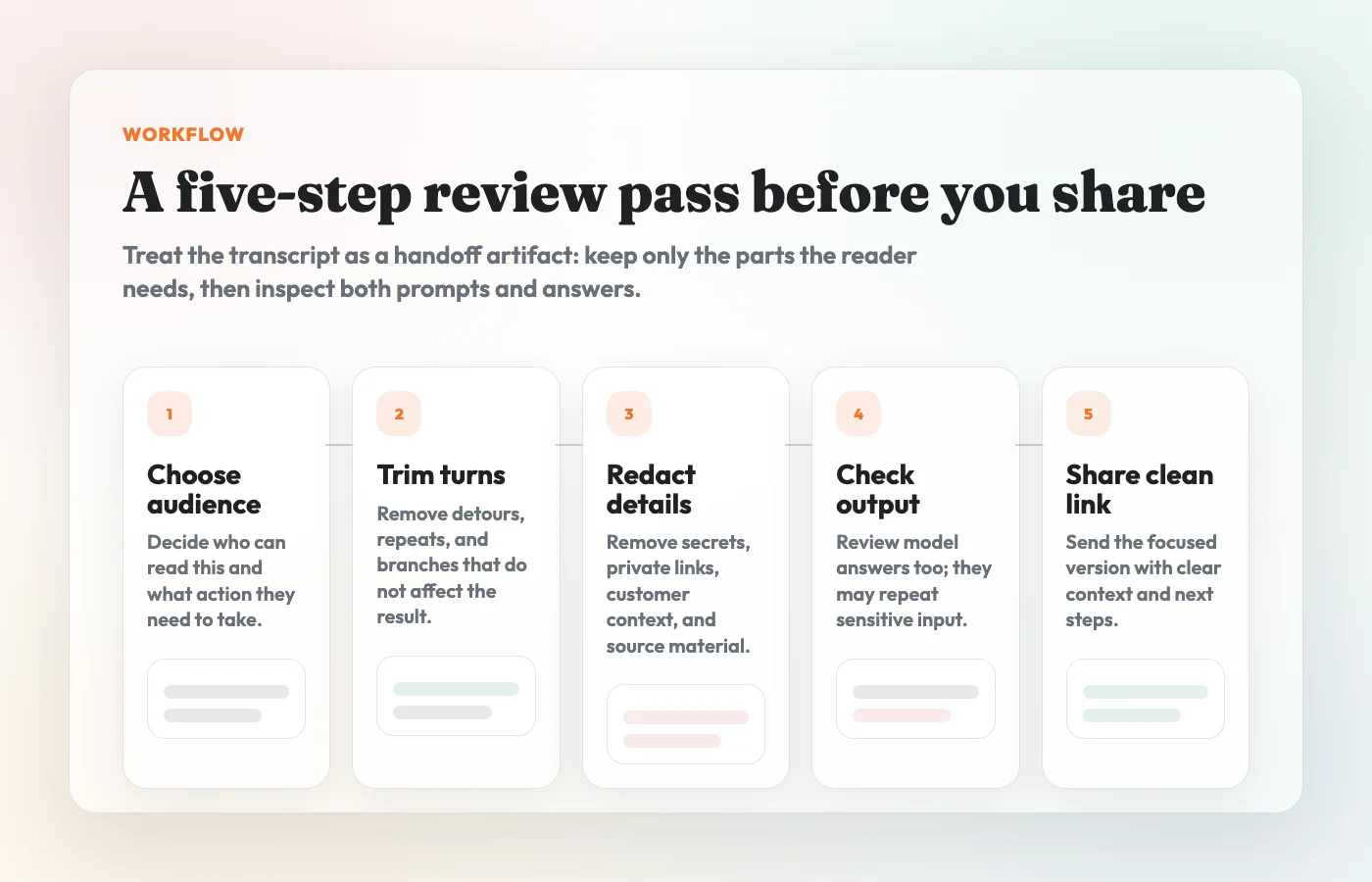
1. Start With The Audience
Ask who will read the conversation and what they need to do with it.
A developer reviewing a bug fix may need the prompt, the error message, and the final code. A manager reviewing a recommendation may need the constraints and decision table. A public audience may need only a generalized example and the final lesson.
The audience decides what context is necessary.
2. Keep The Minimum Useful Context
Most AI conversations contain more history than the reader needs.
Keep:
- the original task or prompt if it explains the answer
- the constraints that shaped the output
- one important correction or follow-up
- the final recommendation, checklist, table, code, or summary
- source links that are safe and relevant
Cut:
- repeated attempts
- abandoned branches
- casual side comments
- private context that does not change the conclusion
- model output that copied sensitive details back to you
The goal is not to make the conversation look perfect. The goal is to make it safe and useful.
3. Replace Private Details With Plain Placeholders
Do not replace private data with fake private data. Use neutral labels that tell the reader what kind of detail was removed.
For example:
Before:
Summarize this customer escalation and draft a reply.
The prompt includes a customer name, an email address, a private support ticket,
and a billing detail that the reader does not need.

After:
Summarize this customer escalation and draft a reply.
Context removed: customer identity, private support ticket, and billing detail.
Keep the tone concise and include the proposed next step.
The after version preserves the task without inventing a fake customer, fake email, or fake incident. That is usually cleaner than swapping in realistic-looking placeholder data.
4. Check The Model's Answer, Not Just Your Prompt
Sensitive information often comes back in the model output.
If your prompt included a private URL, the answer may repeat it. If you pasted internal notes, the summary may include the same names, dates, or decisions. If you asked for code, the output may include environment variables, file paths, or comments copied from your context.
Review the whole cleaned transcript, including:
- prompts
- assistant responses
- code blocks
- tables
- quoted text
- filenames and paths
- links
- image alt text or captions, if present
Redaction is not done until the output is clean too.
5. Treat Training Settings And Sharing Settings Separately
Data controls are not the same as redaction.
OpenAI's help docs describe settings that control whether conversations help improve models, and separate documentation explains how shared links work. Those are important controls, but they do not remove private details from a transcript you choose to share.
Think of it this way:
| Question | Control to check |
|---|---|
| Can this platform use my chat to improve models? | Data controls and account/workspace settings |
| Can someone view this shared conversation link? | Native sharing settings and link access |
| Is the conversation safe to send? | Your redaction review |
You need the third check even when the first two are configured correctly.
What Not To Share
Do not share an AI conversation that still contains:
- API keys, passwords, tokens, private keys, or credentials
- customer, employee, patient, student, or vendor details the reader does not need
- internal URLs, dashboards, repo names, private file paths, or access links
- copied private documents, emails, contracts, meeting notes, or transcripts
- financial, health, legal, HR, or account information
- unreleased roadmap, pricing, strategy, hiring, or incident details
- security-sensitive debugging details that could help someone misuse a system
- copyrighted or licensed material you do not have permission to redistribute
- native shared links you have not reviewed from start to finish
This is not a legal checklist. It is a practical sharing checklist. If your workplace has a policy for customer data, confidential documents, regulated data, or public communications, follow that policy before sharing.
Native Shared Link vs Clean Transcript
Native shared links are convenient when the original chat snapshot is the artifact. A clean transcript is better when you want to control what travels with the link.
| Option | Best for | Redaction risk |
|---|---|---|
| ChatGPT or Claude shared link | Showing the original conversation snapshot | May include more history than the reader needs |
| Screenshot | Showing one short visual moment | Easy to miss sensitive text inside an image |
| Clean transcript link | Sharing selected, reviewed turns | Safer only if you actually redact before sharing |
| Internal doc | Long-term documentation with comments and owners | Heavier workflow, but better for formal review |
For most work handoffs, a cleaned transcript is the better default. It lets you remove unnecessary context, preserve useful text, and add a short note about what the reader should review.
How Highlight Reel Fits
Highlight Reel is useful when you want a cleaner artifact than a raw chat link or a stack of screenshots.
Use it to:
- select the useful turns from an AI conversation
- preserve prompts, answers, links, code, and tables as readable text
- remove noisy branches before sharing
- create a page that is easier to skim on mobile
- send a focused link in Slack, Notion, email, docs, or a ticket
But treat Highlight Reel as a drafting and sharing tool, not an automatic privacy filter. It does not guarantee that a conversation is safe, compliant, or fully redacted. Before you share, review the selected content yourself and remove sensitive information.
Final Review Before You Send
Before you paste the link into a message, read the cleaned page from the recipient's point of view.
Ask:
- Could this be forwarded without surprising me?
- Does the reader need every detail that remains?
- Did I remove sensitive details from both prompts and answers?
- Are placeholders clear without pretending to be real examples?
- Are code blocks, links, and tables still useful?
- Does the page say what the reader should do next?
If the answer is no, do one more cleanup pass.
FAQ
Is redacting an AI conversation the same as deleting the original chat?
No. Redacting a shared artifact removes information from the version you send to someone else. Deleting or managing the original chat is a separate action inside the AI platform.
Can I rely on ChatGPT or Claude shared links instead?
Use native shared links when the original snapshot is exactly what the reader needs and you have reviewed the whole conversation. Use a clean transcript when you want to trim, redact, and explain the useful parts before sharing.
Is a cleaned transcript automatically safe?
No. The format helps because you can edit and review it, but safety comes from the redaction pass. A cleaned transcript that still contains private details is still a risky transcript.
Should I redact the prompt or the answer?
Both. The answer may repeat names, links, file paths, or details from the prompt. Review every visible part of the shared page.
What should I use instead of fake private data?
Use plain placeholders such as customer name removed, private URL removed, or billing detail removed. Realistic fake data can confuse readers and make the example feel more specific than it is.
When should I not share the conversation at all?
Do not share it if the useful point depends on details you are not allowed to disclose, if your organization requires a different review path, or if you cannot confidently remove the sensitive context.