AI Agent Context Brief Template for ChatGPT, Claude, Cursor, and MCP
A copyable brief for giving ChatGPT apps, Notion Custom Agents, Microsoft Agent 365, Claude, Cursor, Codex, or MCP tools the context they need before work starts.
May 13, 2026

AI agents are getting easier to create. ChatGPT apps can connect to work tools. Notion Custom Agents can run recurring workflows. Microsoft Agent 365 is positioned around observing and governing agent activity. MCP servers can expose tools and context to AI systems.
Highlight Reel
Turn AI conversations into reusable context
Save the useful turns, decisions, and project rules as a clean context packet your team can reuse.
That does not mean you should start every agent task with a blank prompt.
Before an AI agent reads files, calls tools, updates a system, or drafts work for a team, give it a context brief. The brief should explain the task, boundaries, source material, approval rules, and expected output.
The official references matter for different reasons: Notion's Custom Agents documentation shows why tools, access, Slack, and model choice need to be explicit; Microsoft's Agent 365 framing shows that teams are moving toward agent observation and governance; OpenAI and Anthropic MCP documentation shows why tool and context boundaries matter once an AI client can call external systems.
Quick Answer
Use this AI agent context brief when:
- the task touches real team work
- the agent can read or write through tools
- the source material is scattered across chats, docs, tickets, or files
- the agent should follow project rules
- a teammate may need to review what happened later
The brief is not bureaucracy. It is a small control layer before the agent starts.
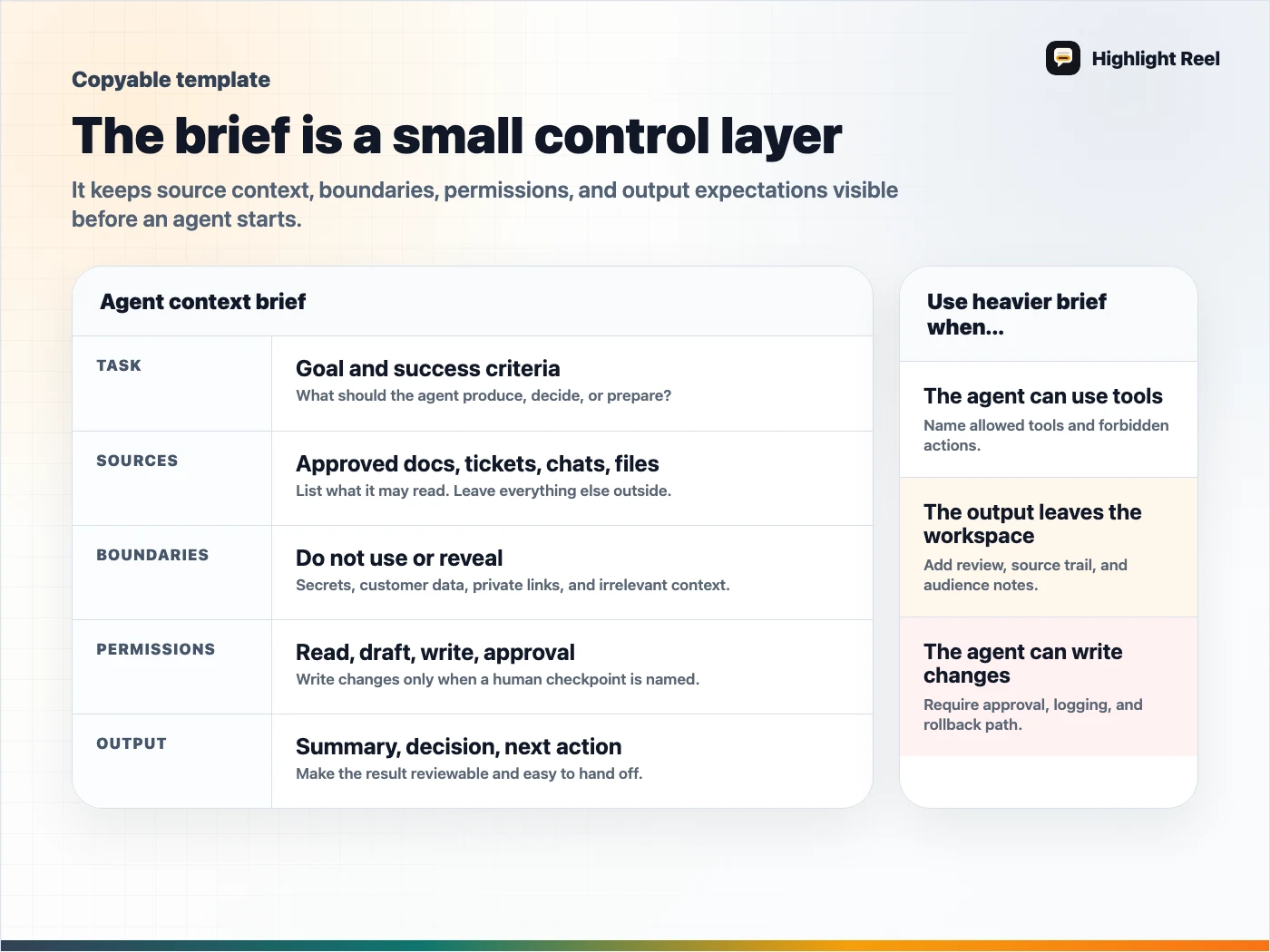
Download the AI agent context brief card
Copyable Template
# AI Agent Context Brief

## 1. Task
What should the agent do?

## 2. Success criteria
What would a good result look like?

## 3. Source context
- Relevant conversations:
- Docs:
- Tickets:
- Files:
- Links:

## 4. Boundaries
- Do not use:
- Do not change:
- Do not reveal:
- Stop and ask before:

## 5. Permissions
- Read-only sources:
- Tools the agent may use:
- Write actions allowed:
- Human approval required for:

## 6. Project rules
- Tone:
- Terminology:
- Formatting:
- Security or privacy rules:
- Known constraints:

## 7. Output format
- Summary:
- Decision:
- Steps taken:
- Files or systems touched:
- Open questions:
- Next action:

## 8. Review checklist
- [ ] Sources were relevant.
- [ ] Private context was not exposed.
- [ ] Write actions were approved.
- [ ] The output can be understood by someone who did not run the agent.
Filled Example: Read-Only Context For A ChatGPT App Or MCP Connector
# AI Agent Context Brief

## 1. Task
Summarize three customer-support conversations and turn them into a product feedback handoff.

## 2. Success criteria
The output should list recurring issues, customer language, affected flows, and the smallest product change to investigate.

## 3. Source context
- Relevant conversations: three cleaned Highlight Reel links
- Docs: current onboarding copy
- Tickets: SUPPORT-184, SUPPORT-191
- Files: none
- Links: internal feedback board

## 4. Boundaries
- Do not include customer names, emails, account IDs, or billing details.
- Do not infer churn risk unless the customer said it directly.
- Stop and ask before recommending pricing changes.

## 5. Permissions
- Read-only sources: cleaned conversation links, onboarding copy, support tickets
- Tools the agent may use: search approved docs, summarize selected text
- Write actions allowed: none
- Human approval required for: posting to Slack, creating tickets, editing docs

## 6. Project rules
- Tone: concise and evidence-first
- Terminology: use "share link" and "clean handoff", not internal shorthand
- Known constraints: no raw transcript should be pasted into public channels

## 7. Output format
- Summary
- Pattern table
- Evidence snippets
- Recommended next action
- Open questions
This example is intentionally read-only. It gives the agent enough context to help without quietly turning a connector or tool into an unreviewed write path.
Why Agents Need A Brief
An AI agent can be powerful precisely because it can use more context and tools than a normal chat. That is also why the setup matters.
Without a brief, the agent may:
- optimize for the wrong audience
- use stale or irrelevant sources
- reveal private context in a summary
- take an action that should have been reviewed
- produce a result that nobody can audit later
The brief makes the work legible before it becomes automated.
When A Short Brief Is Enough
Use a short version for lightweight work:
Task:
Audience:
Sources:
Do not include:
Output format:
Ask before:
This is enough for drafting, summarizing, organizing, or preparing a first-pass handoff.
Mandatory Fields By Risk Level
| Task type | Minimum fields |
|---|---|
| Read-only summary | Task, audience, sources, do-not-include list, output format |
| Research or planning | Task, sources, assumptions, decision criteria, open questions |
| Coding or product work | Repo/path scope, files in scope, forbidden changes, tests to run, output format |
| Customer-support triage | Redaction rules, allowed labels, escalation rule, private fields to remove |
| Write-capable agent | Permissions, approval rule, logging expectation, rollback owner |
Hard stop: if write actions are allowed but approval or logging is unclear, keep the brief read-only.
Write-Action Approval Block
Add this when an agent may create, update, post, or delete:
## Write-action approval
- Allowed write actions:
- Actions that require human approval:
- Where logs should be saved:
- Rollback owner:
- Stop immediately if:
When You Need The Full Brief
Use the full version when:
- the agent can post, edit, create, update, or delete
- the work affects customers or coworkers
- the agent reads private workspace content
- the output will become a decision record
- a manager, security reviewer, or teammate may ask what context was used
In those cases, the context brief becomes part of the audit trail.
How To Build The Brief From A Long AI Chat
If the context is trapped in a long ChatGPT, Claude, Gemini, Cursor, or Codex session, do not paste the entire chat into the agent.
Instead:
- Select the useful turns.
- Remove private or irrelevant context.
- Summarize the stable project facts.
- Pull out decisions and constraints.
- Link to source material.
- Save it as a context packet.
Highlight Reel is useful here because it helps turn long AI conversations into clean, readable context before that context is given to another person, agent, or tool.
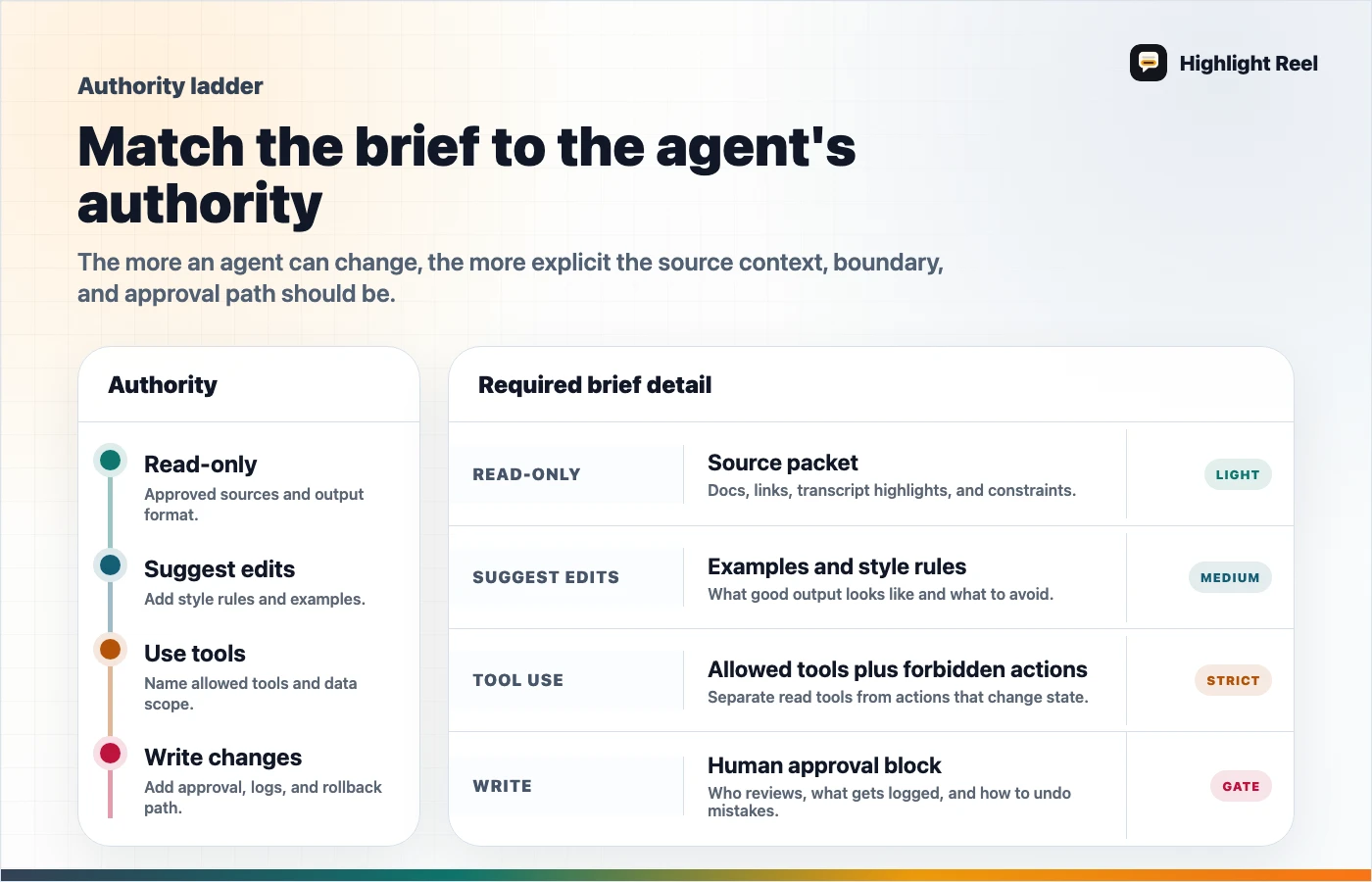
Download the AI agent risk ladder
FAQ
Is this template only for coding agents?
No. It works for coding agents, research agents, Notion Custom Agents, ChatGPT apps, support triage agents, and workflow automation.
Is this the same as a prompt?
Not exactly. A prompt tells the agent what to do now. A context brief gives the agent the work environment, boundaries, and review expectations.
Should the brief include private data?
Only if the agent needs it and the tool is approved to access it. If the reader or agent does not need a detail, remove or generalize it.