AI Meeting Transcript Cleanup Template: Turn Notes Into Decisions
A copyable template for turning an AI meeting transcript or Notion AI Meeting Notes summary into a cleaner teammate handoff with decisions, owners, and action items.
May 13, 2026

An AI meeting transcript is not the same thing as a meeting handoff. The transcript shows what happened. A handoff tells the next reader what mattered, what changed, who owns what, and what still needs a decision.
Highlight Reel
Turn meeting transcripts into clean handoffs
Use Highlight Reel to keep the useful parts of an AI transcript, remove private context, and share a readable follow-up link.
Use this AI meeting transcript cleanup template after a call, standup, customer interview, planning session, or review where an AI tool produced a raw transcript, summary, or action-item list.
Quick Answer
Clean an AI meeting transcript in this order:
- Confirm consent and sharing boundaries.
- Remove private or irrelevant transcript detail.
- Keep decisions, action items, risks, and source evidence.
- Separate what was said from what was decided.
- Add owners, due dates, and unresolved questions.
- Share the clean handoff, not the entire raw transcript, unless the reader truly needs it.
This is especially useful for Notion AI Meeting Notes, which can generate summaries and transcript-linked citations, but still needs human review before it becomes a teammate-ready follow-up.
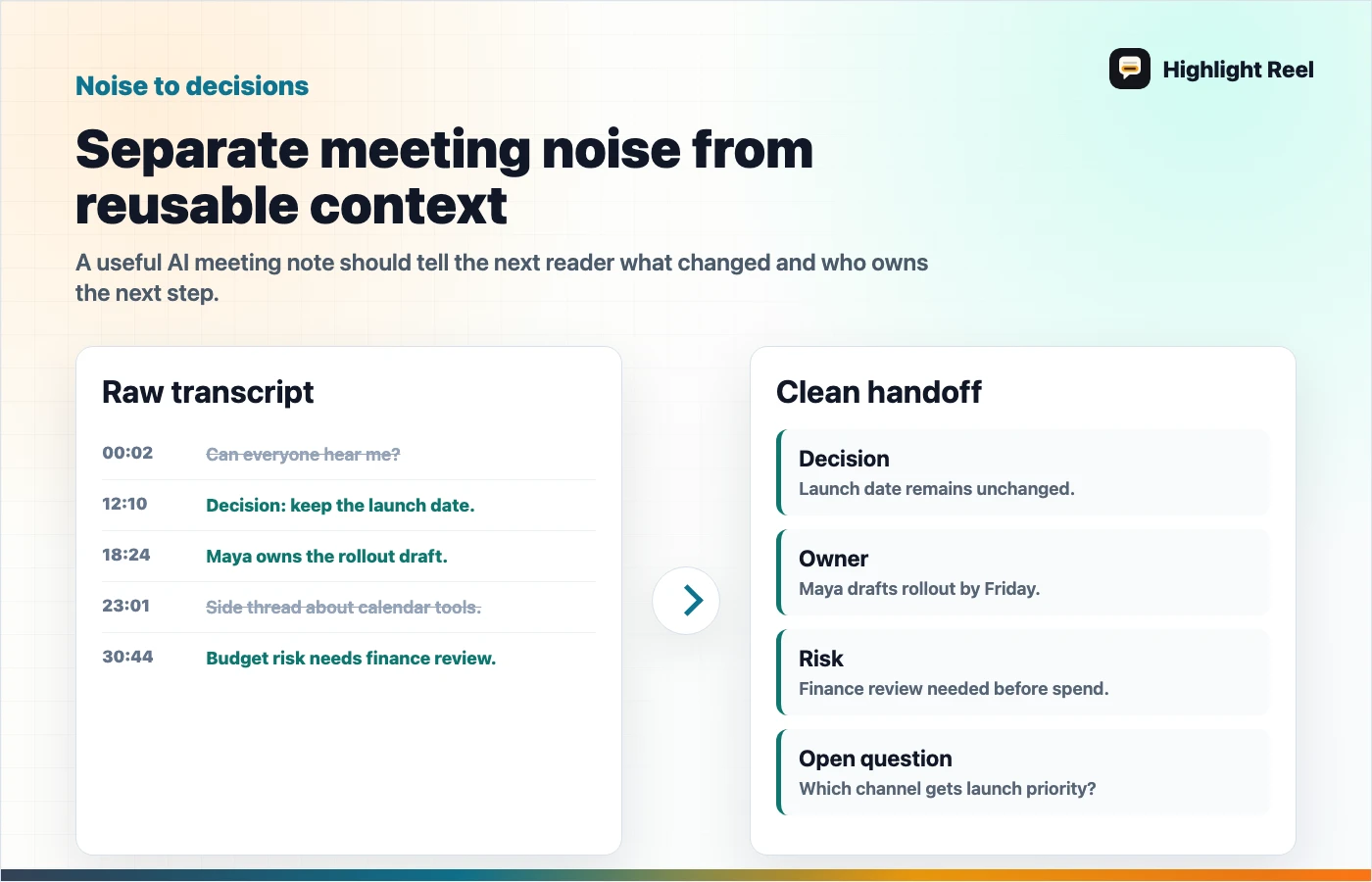
Download the AI meeting transcript cleanup map
Copyable Template
# AI Meeting Transcript Cleanup

## Meeting
- Topic:
- Date:
- Source transcript or notes:
- Attendees:
- Reviewer:

## 1. One-paragraph summary
What happened in plain language?

## 2. Decisions
| Decision | Owner | Evidence from transcript | Follow-up needed? |
| --- | --- | --- | --- |
|  |  |  | Yes / No |

## 3. Action items
| Action | Owner | Due date | Source line or note | Status |
| --- | --- | --- | --- | --- |
|  |  |  |  | Open |

## 4. Open questions
- Question:
  - Who can answer:
  - Needed by:
  - Why it matters:

## 5. Risks or blockers
- Risk:
  - Signal from meeting:
  - Owner:
  - Next check:

## 6. What was removed before sharing
- [ ] Personal or sensitive details
- [ ] Side conversations
- [ ] Unneeded attendee names
- [ ] Raw transcript sections that do not affect the follow-up
- [ ] Unverified AI assumptions

## 7. Share-ready follow-up
Write the message that will go to Slack, email, Notion, Linear, Jira, or a project doc.
Cleanup Checklist
## AI Meeting Notes Cleanup Checklist

### Consent and access
- [ ] The meeting was recorded or transcribed with the right disclosure.
- [ ] The transcript or note is shared only with people who need it.
- [ ] Auto-sharing settings were checked if the note came from a calendar event.
- [ ] The final handoff does not expose the full transcript unless necessary.

### Transcript quality
- [ ] Speaker labels were checked for obvious mistakes.
- [ ] Important decisions were compared against the transcript or citations.
- [ ] Action items were rewritten as concrete tasks.
- [ ] Ambiguous statements were marked as open questions, not decisions.

### Privacy and scope
- [ ] Customer names, personal details, and sensitive internal context were removed if not needed.
- [ ] Side comments and unrelated discussion were cut.
- [ ] The handoff says what was removed at a high level.

### Follow-up
- [ ] Each action item has an owner.
- [ ] Each decision has a source or meeting moment.
- [ ] Each open question has a next step.
- [ ] The destination format matches where the team will act.
Why Raw AI Meeting Notes Still Need Cleanup
AI meeting notes can help you stay present during the meeting. Notion's AI Meeting Notes documentation says the feature can transcribe meetings, identify key points and action items, and provide transcript citations in summaries. That is a strong starting point, not a finished team artifact.
The cleanup pass is where you decide:
- what the next reader actually needs
- which transcript details should not travel
- whether an action item is real or just a suggestion
- whether a decision was final or only discussed
- where the follow-up should live
If the meeting was messy, the cleanup should make the mess visible without forcing everyone to reread it.
Meeting Notes Cleanup Flow
| Step | What to do | Output |
|---|---|---|
| Review access | Check who can view the note or transcript | Sharing boundary |
| Read summary | Compare AI summary against transcript moments | Corrected summary |
| Extract decisions | Pull out final decisions only | Decision table |
| Extract actions | Rewrite action items as tasks | Owner and due date list |
| Redact | Remove details the reader does not need | Safer handoff |
| Route | Send to the place work continues | Slack, doc, ticket, or project note |
This flow is written around Notion AI Meeting Notes, and it can be adapted to notes from Zoom, Google Meet, Microsoft Teams, or other meeting-summary tools after you check each tool's own access and recording settings.
Destination Variants
| Destination | Best shape |
|---|---|
| Slack or Teams | Short summary, top decisions, action items, link to clean handoff |
| Notion or Google Docs | Full cleaned note with decision and action tables |
| Linear, Jira, or GitHub | Only the decision, acceptance criteria, owner, and evidence |
| Customer follow-up email | Agreed points, next steps, owner, and no internal side discussion |
| Manager update | What changed, risks, blockers, and next decision needed |
Do not paste a full AI meeting transcript into a busy channel when a five-line handoff will do the job.
Fictional Filled Example
This is a fictional placeholder example, not a real meeting, customer story, or metric.
# AI Meeting Transcript Cleanup

## Meeting
- Topic: onboarding flow review
- Date: 2026-05-12
- Source transcript or notes: Notion AI Meeting Notes
- Attendees: product, design, support
- Reviewer: product lead

## 1. One-paragraph summary
The team agreed that the current onboarding flow asks for too much information before the user sees value. Support shared two recent examples where users abandoned setup at the source-selection step. Design will test a shorter first-run flow that creates a sample handoff before asking for every workspace detail.

## 2. Decisions
| Decision | Owner | Evidence from transcript | Follow-up needed? |
| --- | --- | --- | --- |
| Reduce first-run setup to one required source and one optional note | Design lead | Support examples plus product discussion | Yes |

## 3. Action items
| Action | Owner | Due date | Source line or note | Status |
| --- | --- | --- | --- | --- |
| Draft the shorter onboarding wireframe | Design lead | Action item from summary | Open |
| Pull two anonymized support examples | Support lead | Customer examples discussed | Open |

## 4. Open questions
- Should sample handoffs be visible before login?
  - Who can answer: product and engineering
  - Needed by: next design review
  - Why it matters: affects routing and privacy copy

## 5. Risks or blockers
- Risk: the shorter flow may hide permissions too late.
  - Signal from meeting: engineering asked for earlier permission review.
  - Owner: product lead
  - Next check: design review
What To Verify Before Sharing
Before the cleaned handoff leaves your workspace, check the official settings and product behavior for the tool that created the transcript. For example, Notion documents consent options, transcript behavior, auto-sharing settings for internal calendar participants, and default meeting databases. Product settings should define access; the cleanup template only defines the shareable handoff.
Avoid claims like "this transcript is private forever" or "deleted notes disappear everywhere" unless your specific platform documentation says so. A safer handoff says exactly what you checked: who can access the note now, where the clean version will be shared, and what was intentionally removed.
How Highlight Reel Fits
Highlight Reel is useful after the cleanup decision is made. You can take the useful turns, decisions, and source-backed notes from a long AI transcript and turn them into a clean share link.
That helps when:
- the raw transcript is too long
- the meeting included private side context
- the follow-up needs to be readable outside the meeting group
- a teammate needs the decision trail, not every word
The product bridge is simple: AI tools capture the meeting, and Highlight Reel helps turn the usable parts into a shareable work artifact.
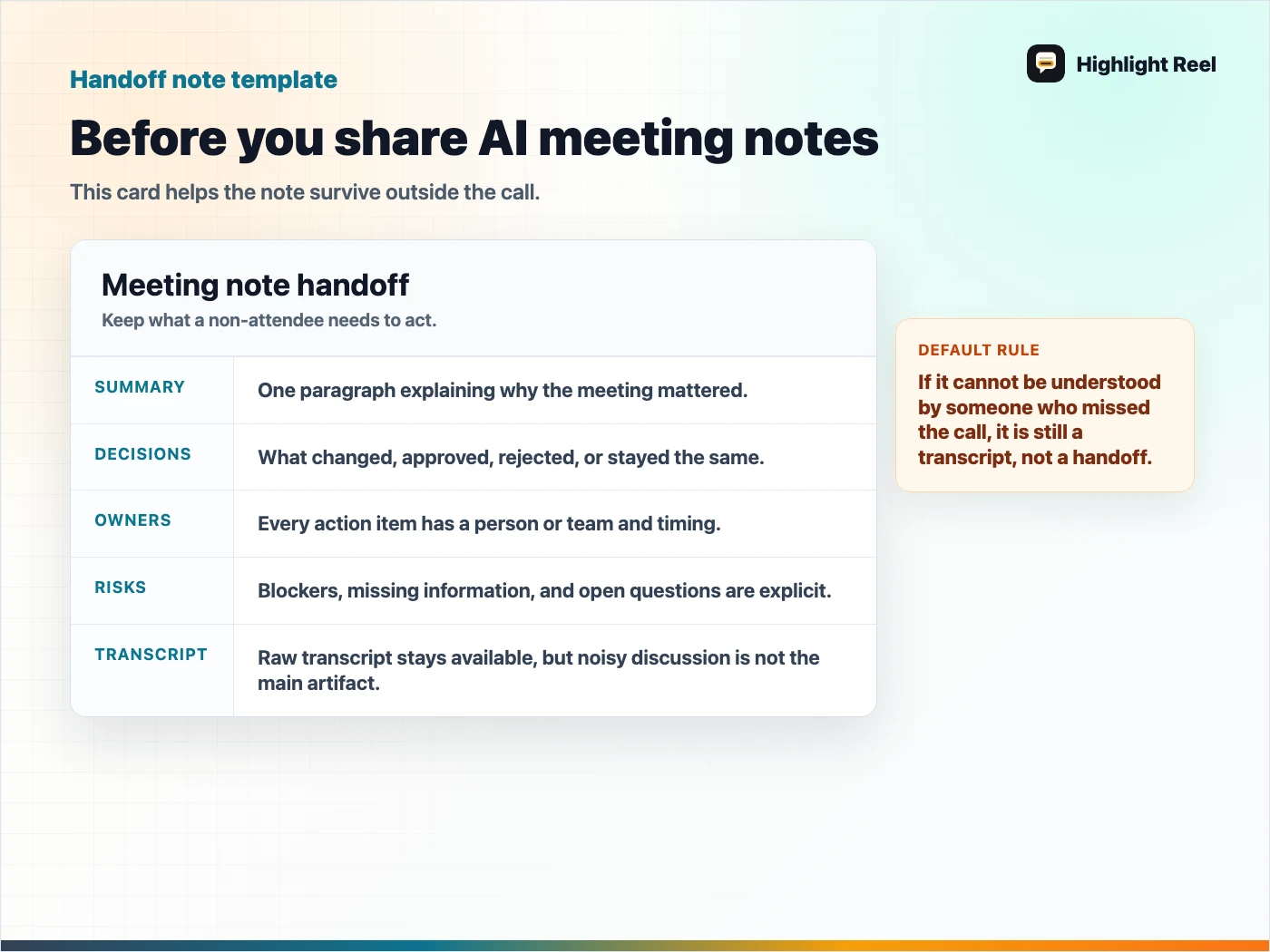
Download the AI meeting note handoff checklist
FAQ
Should I share the raw AI meeting transcript?
Share the raw transcript only when the reader needs the full record and has permission to see it. For most follow-ups, a cleaned summary with decisions, owners, and action items is easier to act on.
What should I do when the AI summary and transcript disagree?
Trust the reviewed transcript evidence over the polished summary. Mark uncertain items as open questions instead of rewriting them as decisions.
Can this template replace official meeting notes settings?
No. Use official product settings for recording, consent, access, and retention. This template only helps you turn the output into a clearer handoff.