Claude Shared Chats vs Clean Transcript Links: What to Send Coworkers
A practical guide to deciding when to send a Claude shared chat link and when to turn the useful parts into a cleaner transcript link for work.
April 27, 2026
Send a Claude shared chat when the original conversation snapshot is the artifact. Send a clean transcript link when a coworker needs the useful parts of the conversation in a readable, trimmed, and redacted format.
Highlight Reel
Share the useful Claude turns, not the whole thread
Paste the useful parts, keep the context, redact private details, and send coworkers a cleaner page.
Native shared chats are fast. Clean transcript links are better handoffs. The difference matters because most work conversations do not need every turn. They need the context, the decision, the supporting answer, and a safe way to reuse the result.
Quick Answer
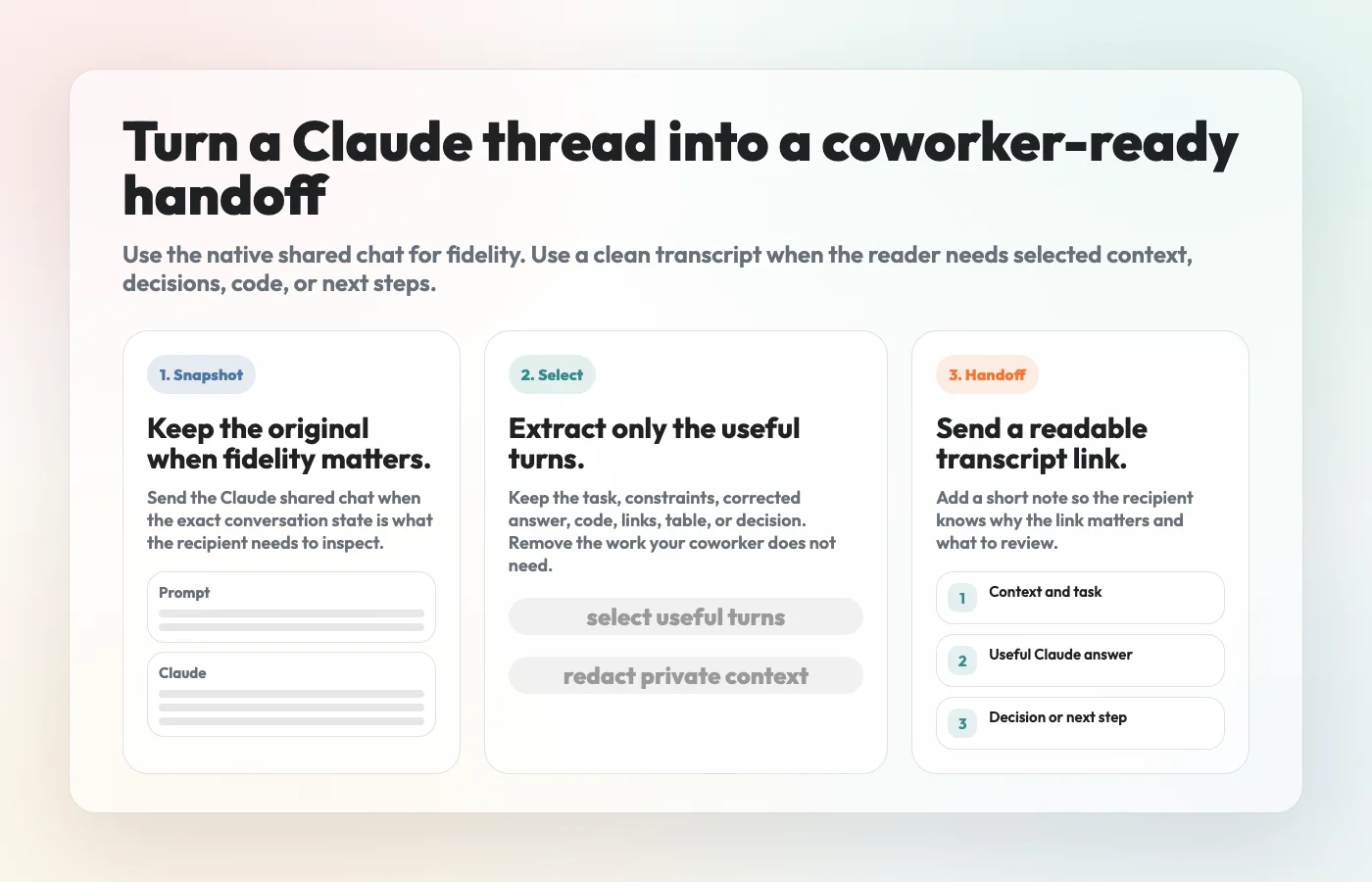
Use Claude's native shared chat when the recipient needs to see the original Claude thread as it existed at a point in time.
Use a clean transcript link when the recipient needs to:
- skim the useful parts without reading the whole thread
- copy code, prompts, links, or tables
- understand why a recommendation was made
- review a decision without seeing private context
- save the exchange in Slack, Notion, email, docs, or a ticket
For team handoffs, the safer default is often:
- keep the prompt or setup that matters
- keep the useful Claude response
- remove false starts and irrelevant branches
- redact sensitive details
- preserve code, links, tables, and decisions as real text
- share the cleaned transcript with a short note about what to review
What Claude Shared Chats Are Good At
Claude shared chats are useful when you want to share a native Claude snapshot without rebuilding the conversation somewhere else.
Anthropic's help documentation describes shared chats as shareable snapshots. A shared link lets someone view the conversation content that was shared, and Anthropic also documents how to unshare previously shared chats. That makes the feature useful for quick, direct sharing when the original chat itself is the thing you want someone to inspect.
Use a Claude shared chat when:
- the recipient asked for the original conversation
- the thread is short and already clean
- the exact sequence of messages matters
- the chat includes a Claude artifact the recipient should inspect
- the conversation contains no private or unnecessary context
In other words, a native shared chat is best when fidelity matters more than editing.
Where Native Shared Chats Get Awkward At Work
The same thing that makes native shared chats convenient can make them awkward in a workplace: they preserve the conversation as a platform snapshot.
That can be too much information for a coworker who only needs the result.
Common problems include:
- the useful answer is buried after several experiments
- the prompt contains customer names, internal URLs, roadmap details, or private notes
- the final answer depends on a correction that is hard to find
- the thread includes dead ends that make the conclusion harder to review
- links, tables, and code need to be copied into another tool
- the recipient may forward the link beyond the original audience
This does not mean native shared chats are bad. It means they are not always the best work artifact.
What A Clean Transcript Link Is
A clean transcript link is a curated page built from the useful parts of an AI conversation.
It is not a screenshot. It is not a raw dump. It is not a polished blog post pretending the messy conversation never happened.
A good clean transcript keeps:
- the original task or prompt
- the constraints that shaped the answer
- the key correction or follow-up
- the final answer, plan, table, code, or recommendation
- links and references as real clickable links
- enough context for the reader to understand the outcome
It removes:
- private names, tokens, internal URLs, and customer details
- irrelevant branches
- repeated failed attempts
- interface clutter
- anything that would make the reader work harder than necessary
The point is not to hide the work. The point is to turn the conversation into something another person can actually use.
Claude Shared Chat vs Clean Transcript Link
| Option | Best for | Main risk | Coworker experience |
|---|---|---|---|
| Claude shared chat | Showing the original Claude conversation snapshot | May include more context than the recipient needs | Accurate, but potentially noisy |
| Clean transcript link | Sharing the useful turns as a readable work artifact | Requires a short edit and redaction pass | Easier to skim, copy, search, and reuse |
| Screenshot | Showing one short visual moment | Text becomes hard to copy, search, or redact | Fast for tiny moments, poor for long threads |
| Doc or Notion page | Long-term documentation with ownership and comments | Heavier workflow and permission management | Good for durable docs, slower for quick handoffs |
If the question is "what happened in Claude?", send the Claude shared chat.
If the question is "what should I do with this answer?", send a clean transcript link.
A Coworker-Ready Sharing Workflow
Use this workflow before sending any AI chat that came from a real work context.
1. Decide What The Reader Needs
Start with the reader's job, not the chat history.
Ask:
- Do they need to approve a decision?
- Do they need to copy code?
- Do they need to understand the reasoning?
- Do they need the prompt so they can reproduce the result?
- Do they only need the final answer?
This tells you how much of the conversation to keep.
2. Keep The Useful Turns
Most AI threads contain setup, exploration, correction, and output. A good shared transcript usually needs only a subset.
Keep:
- the first prompt if it defines the task
- any constraints that changed the answer
- the key follow-up that improved the result
- the final answer or recommendation
Cut:
- repeated attempts
- branches that were abandoned
- conversational filler
- private details that do not help the reader
3. Redact Before Sharing
Anthropic's sensitive data guidance is a reminder that AI chat content should be treated deliberately. Before sharing, look for information that should not travel with the link.
Check for:
- names and email addresses
- customer or vendor details
- internal URLs
- unreleased product plans
- API keys, tokens, secrets, or file paths
- financial, legal, health, or HR details
- private notes that were only meant for the model
If the reader does not need it, remove it.
4. Preserve Structure As Text
Screenshots flatten everything into pixels. A clean transcript should preserve the useful structure as text.
Keep these elements copyable:
- code blocks
- tables
- links
- numbered steps
- prompts
- checklists
- decisions
That is the practical advantage of a transcript link over a stitched image.
5. Add A Short Handoff Note
Do not send the transcript link naked. Add one or two sentences that tell the recipient what to do with it.
For example:
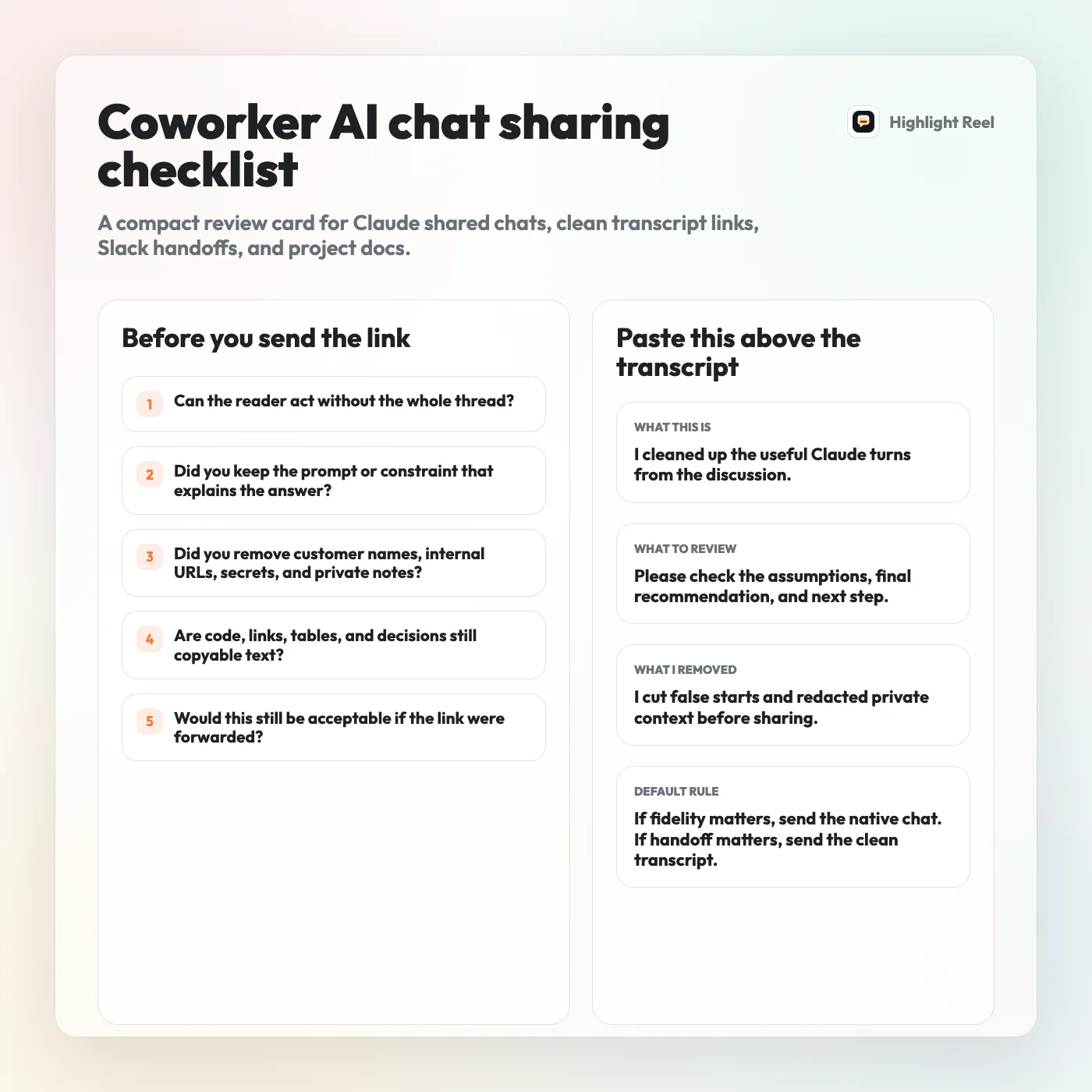
I cleaned up the useful Claude turns from the workflow discussion. The important section is the comparison table and the final checklist. Please check whether the assumptions match our current onboarding flow.
This small note turns a link into a handoff.
Redaction Checklist Before Sharing A Claude Conversation
Before you share a Claude chat or a cleaned transcript, scan for these questions:
| Check | Why it matters |
|---|---|
| Does the link include customer, employee, or vendor names? | The reader may not need identifiable details. |
| Does it include internal URLs or file paths? | These can expose private systems or context. |
| Does it include unreleased roadmap or pricing details? | AI chats often contain strategy notes that were never meant to travel. |
| Does it include secrets, tokens, or API keys? | These should never be shared in a chat artifact. |
| Does the recipient need the whole thread? | If not, trim it before sharing. |
| Would this be okay if forwarded? | Link sharing often escapes the original context. |
If the answer is uncertain, use a cleaned transcript instead of the raw native share.
When To Use Highlight Reel
Highlight Reel fits the middle ground between a raw shared chat and a heavy document.
Use it when you want to:
- select only the useful AI turns
- preserve text structure
- remove noise before sharing
- make the conversation easier to read on mobile
- send a focused link instead of a stack of screenshots
It is not a replacement for internal access control, legal review, or security policy. It is a lightweight way to turn a useful AI exchange into a better handoff.
FAQ
Are Claude shared chats public?
They are not the same as publishing a public web page by default, but a shared link should still be treated as shareable content. If someone has access to the link, they may be able to view the shared snapshot. Check Anthropic's current sharing documentation before relying on a specific access behavior.
Is a clean transcript link safer than a Claude shared chat?
It can be safer when you actually trim and redact it. The safety does not come from the format alone. It comes from removing unnecessary private context before you share.
Should I use screenshots for Claude conversations?
Use screenshots for one short visual moment. Do not use screenshots for long conversations that include code, tables, links, or decisions another person needs to reuse.
Should I include the original prompt?
Usually yes, if the prompt explains the task, constraints, or assumptions. If the prompt contains private details, rewrite or redact it before sharing.
Can I share AI chats in Slack or Notion?
Yes, but the same rule applies: share the smallest useful artifact. A clean transcript link can work well when Slack or Notion readers need the useful exchange without the entire original thread.
The Simple Rule
Native shared chats are for fidelity. Clean transcript links are for handoff.
If the recipient needs the original Claude conversation, send the native shared chat. If they need the answer, decision, code, checklist, or reasoning in a reusable form, clean the transcript first.