NotebookLM Public Notebook Sharing Checklist: What To Review Before You Share
A practical checklist for reviewing sources, access, chat view, caveats, and teammate handoff notes before sharing a NotebookLM public notebook.
May 13, 2026

A NotebookLM public notebook can be a strong way to share source-backed research. It can also be too much if the next person only needs the conclusion, caveats, and next action.
Highlight Reel
Share the research, not just the notebook
Highlight Reel helps you turn notebook-backed research into a clean handoff with sources, caveats, and next actions.
Use this NotebookLM public notebook sharing checklist before you make a notebook public, copy a Chat View link, or send notebook-backed research to a teammate.
Quick Answer
Before sharing a NotebookLM public notebook, check:
- Whether public sharing is available for your account type.
- Whether every source and artifact is safe to expose.
- Whether the reader needs the whole notebook or only a research handoff.
- Whether Chat View is enough for the experience you want.
- Whether the share note explains the answer, caveats, and next action.
- Whether you know how to turn public sharing off later.
Google's NotebookLM help says public sharing is enabled for consumer accounts and currently disabled for Workspace Enterprise or Education accounts. It also notes that Chat View hides materials for a focused experience but does not completely revoke a viewer's underlying access to notebook contents. Treat that as a reason to review the notebook before sharing, not after.
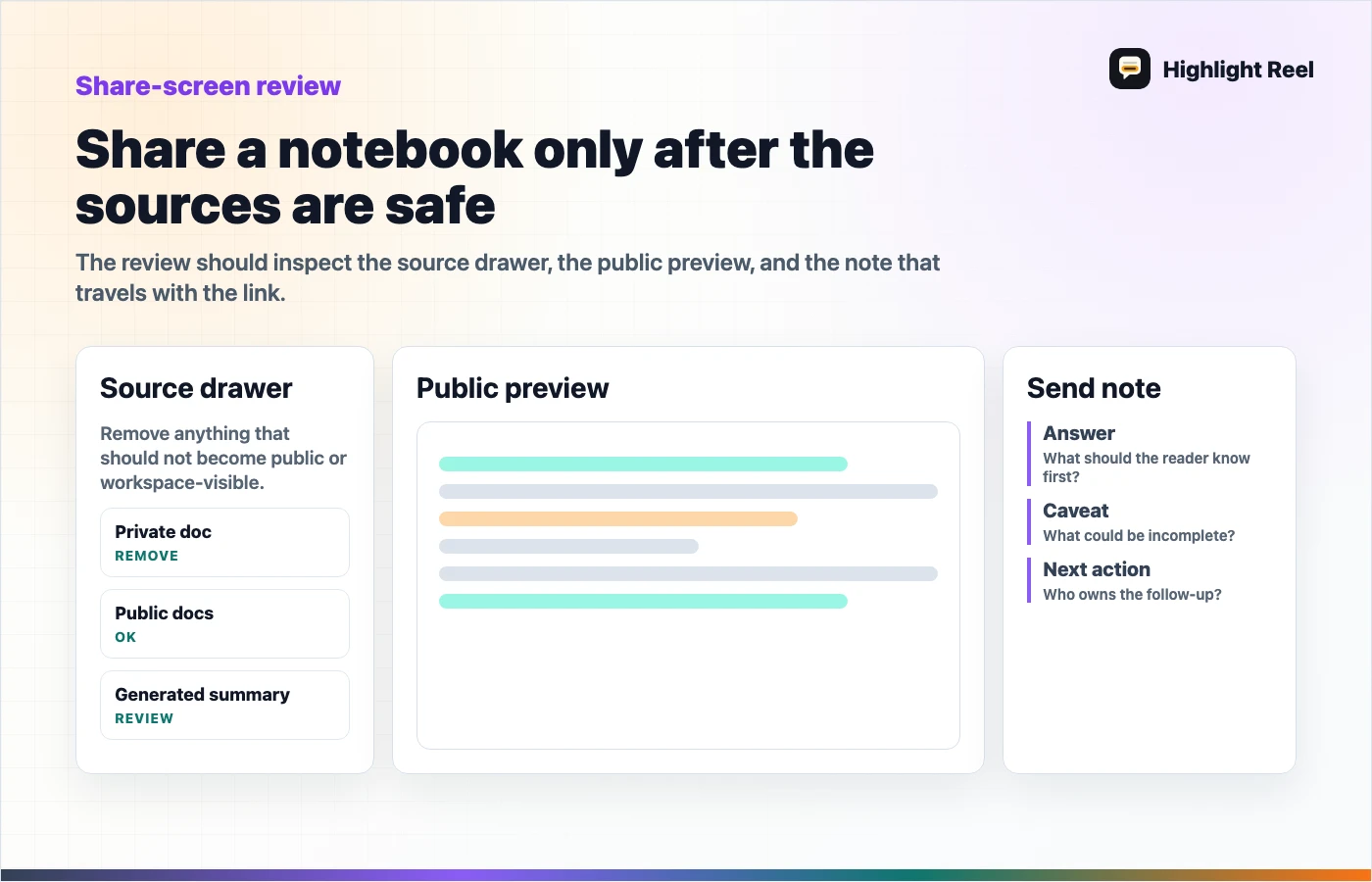
Download the NotebookLM sharing review flow
Copyable Checklist
# NotebookLM Public Notebook Sharing Checklist

## 1. Account and access
- [ ] Public sharing is available for this account.
- [ ] The intended viewers have Google accounts if required.
- [ ] Owner/editor access is limited to the right people.
- [ ] I know who can turn public sharing off.

## 2. Source review
- [ ] Every source can be shared with the intended audience.
- [ ] Copyright or licensing concerns were checked.
- [ ] Private docs, customer details, internal notes, and personal data were removed if not needed.
- [ ] Source names are understandable to a new reader.

## 3. Artifact review
- [ ] Audio overviews, FAQs, briefing docs, notes, or other artifacts are safe to expose.
- [ ] Generated summaries are reviewed against the sources.
- [ ] Any AI-generated output is labeled or caveated where needed.

## 4. Chat View decision
- [ ] Chat View is used only for focus, not as a privacy guarantee.
- [ ] The notebook still passes source review even if viewers navigate beyond the default view.
- [ ] The share note explains what the reader should ask or inspect.

## 5. Handoff note
- [ ] Short answer:
- [ ] Top sources:
- [ ] Caveats:
- [ ] What the reader should do next:
- [ ] Optional link to a clean research handoff:

## 6. Disable plan
- [ ] I know where to set Notebook Access back to Restricted.
- [ ] The team knows who owns future access changes.
Copyable Share Note
Here is the NotebookLM public notebook for the research:

Link:

Read this first:
- Short answer:
- Best source to start with:
- Important caveat:
- What I need from you:

Note: I reviewed the notebook sources and artifacts before sharing. Use the notebook if you want to explore the source material. Use the handoff summary if you only need the decision and next action.
Public Notebook Or Clean Handoff?
| Reader need | Share the public notebook | Share a clean research handoff |
|---|---|---|
| Explore source material directly | Yes | Optional summary |
| Make a quick decision | Usually too much | Yes |
| Review generated artifacts | Yes, if sources are safe | Include selected artifacts |
| Send to someone outside the research group | Only after source review | Often safer and clearer |
| Keep focus on one recommendation | Maybe with a share note | Yes |
The public notebook is best when exploration matters. The clean handoff is best when action matters.
What To Review Before You Click Share
Start with the left-side source list and any generated artifacts. Ask:
- Would I send each source directly to this reader?
- Does any file include private notes, customer details, internal strategy, or copyrighted material we do not have rights to share?
- Are the generated artifacts based on sources the reader may inspect?
- Is there a risk the reader will treat an AI-generated answer as a final recommendation?
- Does the notebook need a short handoff note to frame the work?
If any answer is unclear, do not make the notebook public yet. Create a clean handoff first and link to the notebook later if needed.
How Gemini Notebooks Change The Research Workflow
Google's Gemini notebooks announcement describes notebooks as personal knowledge bases that can organize chats and files and sync across Gemini and NotebookLM. That makes notebook-backed research easier to continue across tools.
It also makes the handoff more important. If research moves between Gemini and NotebookLM, the next reader needs to know:
- which source set was used
- which generated artifact matters
- what conclusion was reviewed
- what is still uncertain
- whether they should explore the notebook or act on the handoff
Do not assume the workspace explains itself.
Filled Example
# NotebookLM Public Notebook Sharing Checklist

## 1. Account and access
- [x] Public sharing is available for this consumer account.
- [x] The intended viewers have Google accounts.
- [x] Owner/editor access is limited to the research lead.
- [x] The research lead owns future access changes.

## 2. Source review
- [x] Public product docs and blog posts only.
- [x] No customer records or internal strategy notes.
- [x] Source names were renamed for clarity.

## 3. Artifact review
- [x] Briefing doc reviewed against sources.
- [x] FAQ includes a caveat that pricing details may change.
- [x] No generated artifact includes private notes.

## 4. Chat View decision
- [x] Chat View link is used for focus only.
- [x] Source list is still safe if a viewer navigates beyond Chat View.

## 5. Handoff note
- [x] Short answer: use a clean handoff for the decision, public notebook for exploration.
- [x] Top sources: vendor docs and official product announcement.
- [x] Caveat: product behavior may change.
- [x] What I need from you: confirm whether this supports the next sprint decision.
Disable Public Sharing
Google's NotebookLM help says owners and editors can turn off public sharing by setting notebook access back to Restricted. It also says that once public sharing is disabled, new visitors to previously generated links will no longer be able to access the notebook, and previous visitors will no longer see it in shared notebooks.
That is useful, but it is not a reason to share casually. Review first. Disable later if the notebook no longer needs to be public.
How Highlight Reel Fits
Highlight Reel is useful when the notebook contains a lot of source-backed work but the reader needs a focused handoff.
You can use it to package:
- the short answer
- selected source notes
- caveats
- decision or recommendation
- next action
- a link back to the public notebook when exploration is needed
NotebookLM remains the source workspace. Highlight Reel becomes the readable bridge from research to team action.
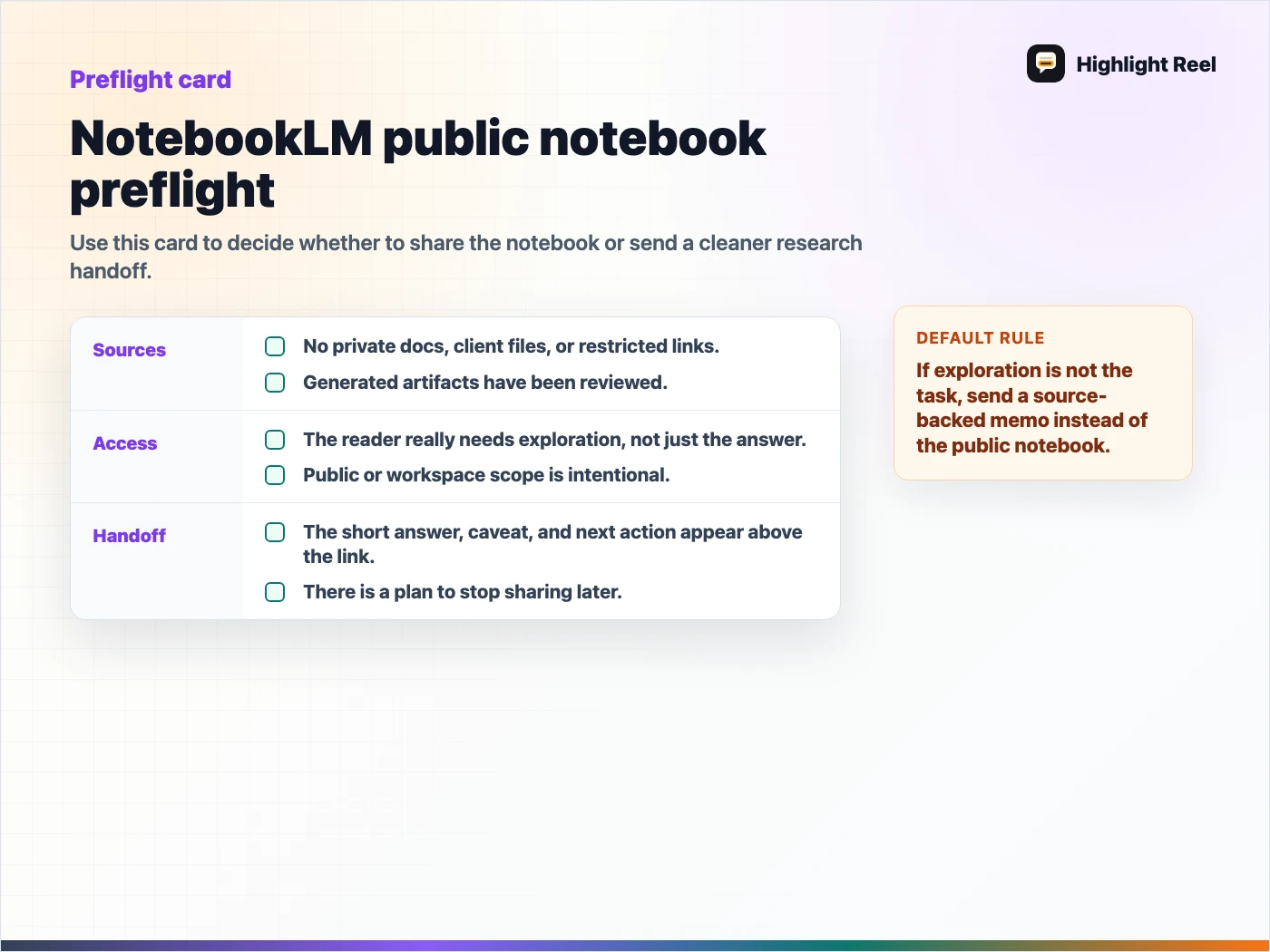
Download the NotebookLM public notebook preflight checklist
FAQ
Is Chat View a privacy setting?
No. Google's help page says Chat View hides materials for a focused experience, but it does not completely revoke a viewer's underlying access to notebook contents. Review the underlying notebook before sharing.
Can Workspace Enterprise or Education accounts use public sharing?
Google's current help page says public sharing is only enabled for consumer accounts and is currently disabled for Workspace Enterprise or Education accounts.
Should I share the notebook or a summary?
Share the notebook when the reader needs to explore sources. Share a clean summary or handoff when the reader needs a decision, caveat, or next action.